loading


Product
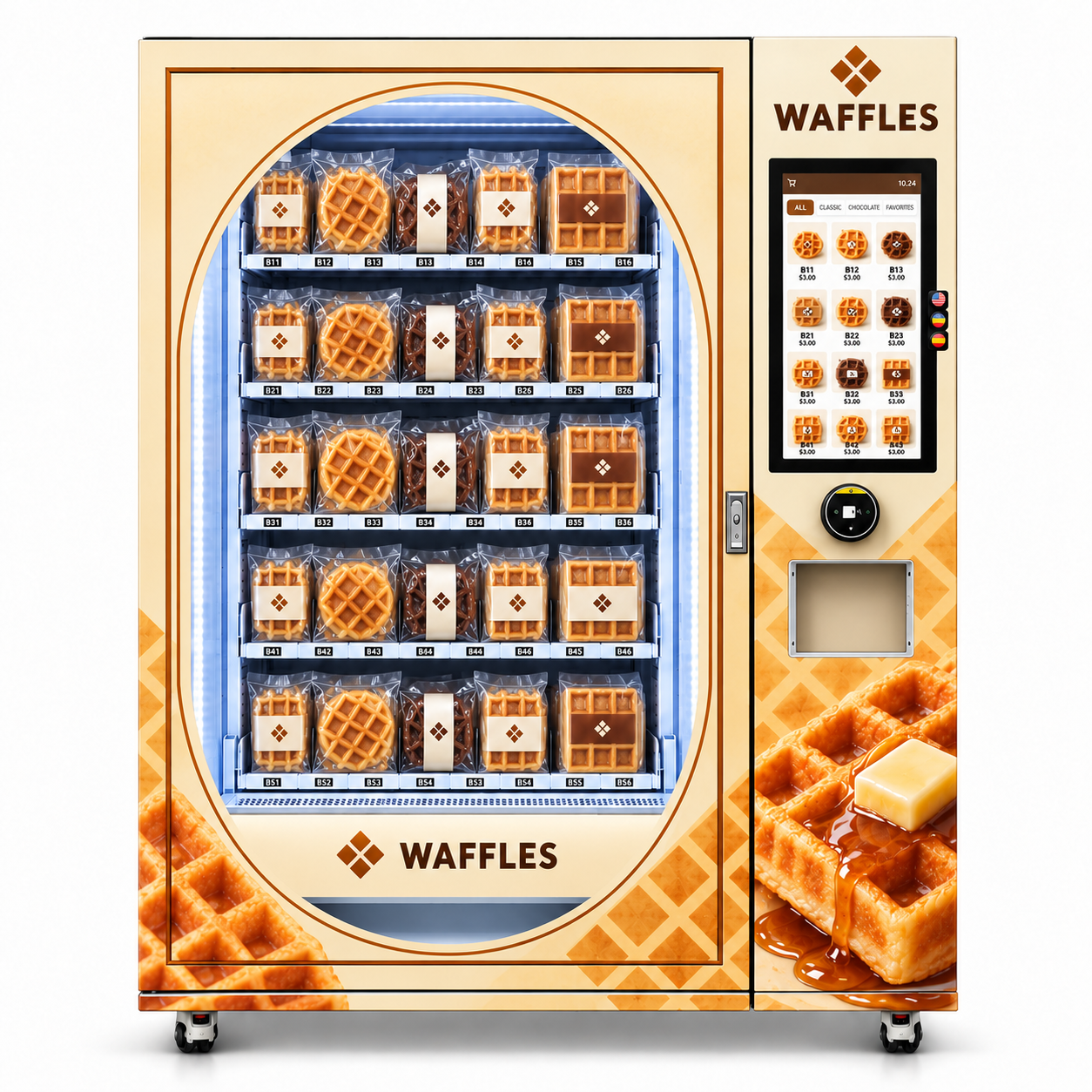
Front view of a cream and caramel waffle vending machine with an illuminated oval product window, individually wrapped waffles, portrait screen and pickup opening.
Left-angle view of a waffle vending machine with golden waffle and butter artwork, visible packaged products and a separate control column.
Right-angle view of a cream waffle vending machine showing the WAFFLES side branding, portrait menu, round reader and collection opening.
Front view of a cream and caramel waffle vending machine with an illuminated oval product window, individually wrapped waffles, portrait screen and pickup opening.
Left-angle view of a waffle vending machine with golden waffle and butter artwork, visible packaged products and a separate control column.
Right-angle view of a cream waffle vending machine showing the WAFFLES side branding, portrait menu, round reader and collection opening.

Waffle Vending Machine | Packaged Waffles & Remote Management

A golden waffle storefront with pack testing, remote tools and costs you can check.

PACKAGED WAFFLES / THE GOLDEN GRID

A golden storefront.
A grounded operating plan.

The reference waffle vending machine presents sealed retail packs behind an illuminated oval-framed window. Cream panels, caramel lattice graphics and waffle photography identify the offer. A portrait catalogue, round reader and collection opening sit in a separate right-hand column.

01

Approve the actual filled pack

Round waffles, rectangular packs and coated recipes need their own test. Check seams, orientation, support, delivery quantity, retrieval and product condition. Visible shelves do not identify the internal mechanism or prove universal compatibility.

02

Match storage and eating instructions

Use verified guidance for the actual recipe and retail pack. Explain whether it is ready to eat or requires preparation. Butter and syrup artwork does not establish baking, warming or dispensing. Confirm any required environmental equipment; no cooling or heating is shown as a verified feature.

03

Plan stock and contribution together

Confirm enabled remote inventory, price and reporting tools, with permissions and recurring charges. Use actual goods, packaging, waste, payment, venue and route costs. Four buyer-input tools cover operating contribution, two-recipe mix, batch window and capacity-aware refill.

Discuss your waffle packs ↗ Manufacturer FAQ ↗
5.0
design customization

    oops...!

    no product data.

    Go to homepage
    WAFFLE RETAIL / THE GOLDEN GRIDA practical guide for the machine buyer

    A CLEAR OFFER IN EVERY SQUARE.

    Waffle vending
    machine.
    A golden storefront.
    A grounded plan.

    Visible packaged waffles, a portrait catalogue and a focused cream-and-caramel identity. Match the appeal to approved packs, suitable storage, useful remote tools and costs you can check.

    Will my packs work? ↗What stays after costs? ↗

    Reference renderings. Cooking, heating, refrigeration, capacity and payment capability require separate confirmation.

    Front view of a cream and caramel waffle vending machine with an illuminated oval product window, individually wrapped waffles, portrait screen and pickup opening.
    THE FRONT / Products in view. Menu to the right. Collection below.
    Think in four practical checks.

    Pack fit · Product condition · Remote routine · Retained contribution

    The waffle pattern sets the theme. The configured order and real tests establish what the machine can do.

    01 / THE PRODUCT, IN PLAIN ENGLISH

    A packaged-waffle shopfront you can operate.

    The supplied design is a waffle vending machine for prepared retail packs. It combines a visible stock window with a right-hand product menu, round reader and collection opening. Think of it as an additional sales point for suitable packaged goods, with the bakery supply and operating routine planned alongside it.

    Prepared packs, not a cooking process.

    The reference shows sealed retail waffles, a stocked window and a separate customer control column. Butter and syrup in the artwork do not establish a heater, baking plates or topping dispenser. No validated capacity, dimensions or warranty came with the images.

    What to check +

    Request one final drawing, approved-pack list, enabled functions and itemised quote. Compare the configuration against actual products and site needs, with essential capabilities tied to acceptance tests.

    What specifications should I request? ↗What does a sale leave? ↗

    02 / READ THE CUSTOMER-FACING LAYOUT

    Let the window attract. Let the menu explain.

    The reference presents a large oval-framed product window on the left and a compact control column on the right. The screen uses product tiles, categories and position-like labels; this is reference content, not a demonstrated production interface.

    Keep the pack and menu aligned

    Use the actual retail pack photo and a readable product name. A location code such as B11 can help an operator, but a shopper also needs flavour, quantity, weight and a clear price. Avoid making the customer decode shelf labels to understand the purchase.

    Practical check +

    Open a product on the supplied software. Compare photo, recipe version, pack quantity and price with the loaded goods. Check the required pre-purchase information and confirm actual language, panel size and touch support.

    Make the transaction visible

    The round reader sits below the portrait screen, with collection underneath. Customers need a clear sequence and a readable outcome, particularly if the payment is declined or a pack does not arrive.

    For your operation: A straightforward journey can shorten confusion and give your support team the right order detail when an exception occurs.

    Practical check +

    Run selection, payment, delivery and retrieval on the intended local setup. Check receipt or transaction reference, decline, cancellation, stock-unavailable and failed-delivery messages. A cart-like symbol does not establish multi-item ordering.

    Test my waffle packs ↗Inspect the reference views ↗

    03 / A PACK TEST, NOT A GUESS

    Round, rectangular and coated formats need their own check.

    The reference assortment includes different shapes and coatings in sealed packs. Test complete filled retail units with their real labels, seams, backing and any tray. A shared product category does not prove every waffle can use the same loading arrangement.

    Round waffles

    A round product may sit in a rectangular bag with loose film extending around it. The outside retail package, not only the edible diameter, determines whether the unit can be stored and delivered predictably.

    For your operation: An approved round format can give the range visual variety while keeping loading instructions specific and repeatable.

    Practical check +

    Measure width, height and thickness of the filled bag, including the seal. Test orientation, film folding and movement at full and low stock. Use actual filled samples instead of an empty bag or a dimension estimated from the image.

    Rectangular waffles

    The pictures show rectangular waffles in clear packs with cream or brown label bands. Corners, ridges and pack stiffness can affect movement, especially when goods are closely loaded or the final unit is released.

    For your operation: A consistent pack can simplify ordering and refill training, with a clear link between the physical product and screen entry.

    Practical check +

    Record the complete pack dimensions and weight. Inspect corners, seals and contents after repeated deliveries in the intended position. Ask for the approved maximum load and collection route; visible dividers do not reveal the internal mechanism.

    Chocolate-coated versions

    Coating can change storage requirements and cosmetic sensitivity without changing the pack size. Surface contact, pressure and site temperature may matter to how the product looks when the customer opens it.

    For your operation: Testing the sensitive variant helps you decide whether a backing, tray or different product choice is worth the extra cost.

    Practical check +

    Use the actual coated recipe and supplier storage guidance. Inspect smearing, sticking, breakage and seal condition before and after delivery. No refrigeration, active temperature control or impact-protection system is established by the render.

    Write the loading guide ↗Match storage to the actual recipe ↗

    04 / PRODUCT CONDITION & DATE CONTROL

    The cabinet does not decide shelf life.

    Storage requirements come from the actual recipe, packaging and food supplier. A ready-to-eat packaged waffle, a product requiring reheating and a chilled recipe are different offers. Choose the intended goods first, then confirm the machine and site can support them.

    Compare product and machine conditions

    Obtain documented storage guidance for plain, coated and any filled variants. Confirm the quoted cabinet operating limits and any required environmental equipment instead of assuming the blue-white internal lighting means refrigeration.

    For your operation: You can narrow the assortment before ordering and avoid a business plan that relies on storage hardware missing from the quote.

    Practical check +

    Ask about temperature and humidity limits, ventilation, direct sunlight and any quoted controls or monitoring. Use the food supplier requirements to decide suitability. These images establish no heating, cooling, frozen storage or cold-chain performance.

    Use verified food information

    Ingredients, allergens, weight and preparation instructions should come from the actual goods. A product tile should help a shopper make a suitable choice, especially where coated and plain versions look similar in a small image.

    For your operation: Accurate information gives the operator and host a reliable answer source and helps prevent an undocumented recipe change entering the range.

    Practical check +

    Check the pack and pre-purchase display requirements of the selling market. Do not invent gluten-free, vegan or allergen-free claims. Update labels, product identity and screen content before introducing a changed recipe.

    Check a proposed batch window ↗Ask about supported date records ↗

    05 / REPEATABLE LOADING

    Make the guide easy for the next operator.

    One retail pack is one stock unit, regardless of how many waffles it contains. Match the screen entry, physical pack and approved position, then keep records aligned after refills, tests and removals.

    Keep one guide from pack to position.

    Use a SKU that separates recipe, weight, count and packaging version. Record orientation, position and tested load. A trained backup person should match the physical pack to the screen entry without guessing from label colour.

    What to check +

    Trace a refill, last unit, successful sale and correction. Reconcile test purchases, removals, damage and failures. Do not infer item-level sensing or automatic date records from a dashboard.

    Plan the stock target ↗Demonstrate the full routine ↗

    06 / REMOTE TOOLS WITH A PURPOSE

    Use the backend to make the next decision easier.

    WEIMI describes general inventory, sales, price, content, status and multi-machine management capabilities. Availability on this cabinet depends on compatible controls, enabled modules, network connection, account rights and charges. Request a demonstration on the configuration being sold.

    See what to bring

    Where supported, sales and stock records can help prepare a pick list before leaving the stockroom. The useful result is a decision about which packs and quantities to carry, not simply a dashboard screenshot.

    For your operation: Better preparation can reduce checking-only visits and make a necessary refill more productive.

    Practical check +

    Confirm update timing, offline indicators and how the count is maintained. Compare a physical position with its remote record after refill and sale. Ask whether low-stock thresholds are set per SKU or allocation.

    Keep the menu and price consistent

    Supported catalogue tools may let an authorised user change photos, names, descriptions and prices remotely. This is useful when introducing a tested coated variant or a revised retail pack.

    For your operation: Controlled content edits can reduce cabinet-side work and keep the purchased pack aligned with the customer-facing description.

    Practical check +

    Demonstrate an edit, acknowledgement and real purchase afterwards. Check displayed and charged amount, language fields and food-information layout. Ask what happens when an update does not reach a disconnected machine.

    Read sales in retail units

    Revenue and quantities answer different questions. Product-level reports can help you see which shape or recipe moved, provided refunds, failures and manual actions have clear definitions.

    For your operation: A report you can reconcile supports purchasing decisions and can save time rebuilding the meaning of each transaction.

    Practical check +

    Request a sample export. Trace one sale and one exception to the payment record. Confirm currency, time zone, gross/net values and whether removed stock is distinct from sold units.

    Manufacturer: general remote-management overview ↗
    Manufacturer: general backend capabilities ↗

    Include recurring costs ↗Test the enabled tools ↗

    07 / UNIT ECONOMICS

    Count the amount left to run the business.

    The reference screen contains illustrative prices; they are not a recommended price list. Use your actual complete-pack price and landed goods cost. Revenue becomes useful only after payment, venue, waste and operating work are accounted for.

    Single-product operating contribution

    Use one SKU or a consistent unit average, in one currency and tax basis. Include packaging and inbound costs in goods cost. Put recurring route, connectivity, software and fixed venue charges in monthly running costs unless already recorded elsewhere. This model assumes one retail unit per payment.

    Enter your figures to calculate. No sales forecast has been filled in.

    Per sold pack

    Price − goods cost − percentage charges − other variable cost = unit contribution.

    Per month

    Sold packs × unit contribution − fixed running costs = monthly operating contribution.

    Compare plain and coated packs ↗Check potential leftover stock ↗

    08 / PLAIN VS COATED

    Compare two product lines without hiding their differences.

    A coated waffle may have a different price, cost and demand from a plain one. This two-line tool lets you compare monthly contribution while subtracting shared running costs once. It does not assume a higher ticket produces more profit.

    Two-recipe monthly contribution

    Enter retail packs sold, not the number of waffles inside. A is the plain format and B is a coated format or another line you want to compare. The tool uses the same combined percentage charges and other per-unit cost for both; adjust your cost basis if the real fees differ.

    Enter your figures to calculate. No sales forecast has been filled in.
    Review the full cost basis ↗Choose the first assortment ↗

    09 / THE SALEABLE WINDOW

    Is this batch bigger than the site can use?

    Buying a larger carton may reduce unit cost while increasing cash tied up and date-related risk. Use remaining life at loading, your planned removal buffer and a realistic demand assumption to assess a proposed batch.

    Batch window and possible remainder

    Run this for one batch of one SKU. Remaining days start at loading; buffer days are your chosen removal margin before the relevant printed date. The tool is a demand comparison, not food-safety advice, a shelf-life recommendation or permission to extend any date.

    Enter your figures to calculate. No sales forecast has been filled in.
    Keep the physical date routine ↗Check the capacity target ↗

    10 / THE NEXT REFILL

    Demand coverage is not a capacity rating.

    A demand target may exceed the approved physical allocation. Keep that difference visible, then change the visit interval or tested allocation. Check dates separately: enough space does not mean enough remaining saleable life.

    Refill target and capacity check

    Use one SKU and a tested capacity allocation. Current stock, buffer and capacity are whole saleable retail packs. Exclude damaged or out-of-cutoff goods from available stock. The tool does not derive capacity from the exterior or rendered row count.

    Enter your figures to calculate. No sales forecast has been filled in.
    Follow the loading guide ↗Cost the actual visit ↗

    11 / A FIRST RANGE YOU CAN LEARN FROM

    Start focused, then use the actual sales.

    More flavours do not automatically mean a stronger business. A small first assortment is easier to approve, explain, count and rotate. Use the site results to decide what deserves more space.

    A focused first range is easier to learn from.

    Start with approved products that differ clearly in recipe or format. Keep quantity, eating instructions and price understandable. Record changes to the range, price and availability so a new flavour is not confused with a change in opening hours or stockouts.

    What to check +

    Compare similar trading periods using actual quantities, contribution and removals. Use the plain-versus-coated tool to see the cost difference; a higher ticket is not automatically a better use of stock cash.

    Compare the product lines ↗Review useful sales records ↗

    12 / THE QUOTE THAT ANSWERS THE SEARCH

    Capacity, price, storage and support need real answers.

    People comparing waffle vending machines need more than attractive artwork. Use this schedule to get the configured figures and scope that decide whether a machine fits the product, site and operating plan.

    The specification schedule for your order
    Item Reference evidence Configured answer to request
    Model and footprint Cream cabinet, caramel lattice graphics and right-hand controls. Model number, measured dimensions, weight, packed size and final installation drawing.
    Window and screen Illuminated stock window and portrait product catalogue are visible. Window material, lighting, measured screen size, resolution, touch support, languages and software version.
    Internal arrangement Rows, dividers and labels appear; arrangements vary by view. One final layout, position count, usable dimensions and any supported adjustment.
    Usable capacity No tested capacity was supplied. Capacity by approved retail pack, orientation and position, with full-to-last-unit evidence.
    Delivery and collection Rectangular pickup opening; internal route is hidden. Mechanism, supported pack dimensions/loads, collection opening, delivery detection and exceptions.
    Food environment Images establish no heating, cooling or humidity control. Operating limits, ventilation and any quoted environmental equipment, monitoring and maintenance.
    Power and network No electrical nameplate or network rating is provided. Voltage, frequency, rated load, plug, grounding, supported connectivity, data charges and offline behaviour.
    Local payment Round reader is visible; provider and market are unconfirmed. Provider, country, currency, methods, account, settlement, percentage/fixed fees and refund workflow.
    Remote functions General manufacturer sources describe management capabilities. Controller compatibility, enabled modules, rights, logs, exports, updates and recurring charges.
    Access and installation Keyed fitting and castors visible. Door access, service space, key handover, handling, levelling/securing and installer responsibility.
    Commercial and service scope No machine price, warranty or response commitment supplied. Itemised quote, shipping, setup, training, parts/labour/freight coverage, exclusions and renewal fees.
    Turn requirements into tests ↗Request the full package ↗

    13 / LOCATION & INSTALLATION

    Choose a useful occasion and a workable route.

    An indoor workplace, campus, hotel or leisure venue may offer a reason to buy a packaged waffle. Check the real audience, competing food offers and route effort before converting passing traffic into expected sales.

    Measure delivery and daily use

    Confirm packed and uncrated size, weight, doors, lifts, turns, steps and unloading. Leave the specified service and ventilation space plus a practical approach to screen, reader and collection.

    For your operation: Early access checks can prevent a second delivery bill and a machine that fits the floor plan but is difficult to operate.

    Practical check +

    Get rated utilities and final-site network coverage. Follow safe movement, levelling or securing instructions. Castors do not establish free movement when loaded. Finish installation with a complete payment, delivery and backend test.

    Put the route into the costs ↗Set a practical interval ↗

    14 / OWNERSHIP AFTER DELIVERY

    Agree how your operator gets help.

    No fixed warranty period or response time was supplied. Ask for a written service package that separates operator training, remote assistance, parts, labour, shipping and any third-party payment or software responsibility.

    Separate the coverage promises

    A parts warranty, remote help and on-site attendance are different commitments. Get the period, exclusions, claim process and freight responsibilities, not just the word “warranty.”

    For your operation: A complete scope makes total ownership cost easier to compare and gives a clearer repair route when a component needs attention.

    Practical check +

    Confirm spares, availability after warranty, training, updates, account renewals and terminal support. Keep service contacts and account ownership with the handover record.

    Complete the handover ↗Ask for itemised terms ↗

    16 / ACCEPTANCE WITH EVIDENCE

    Make the first machine a repeatable operation.

    Use these marks to organise witnessed tests and documents. The counter stays only on this open page and does not certify a machine. Save the real measurements, videos and results with the order.

    0 of 8 checks marked. Marks stay only on this open page.

    Finish the support handover ↗

    17 / BUYER SEARCH INTENT, ANSWERED

    Quick answers to the questions that decide a purchase.

    These answers identify the product and its limits clearly for people, search engines and answer engines. Use them with the configured specification and your own product samples.

    Q1Does this machine make or heat waffles?

    No preparation or heating process is established by the supplied images. The reference shows sealed retail packs. Butter, syrup and waffle photography are decoration, not evidence of an oven, warmer or topping dispenser.

    Q2Is it refrigerated?

    That is unconfirmed. Ask for the configured storage environment and any required active equipment. Match the actual recipe and packaging requirements; internal lighting does not prove cooling or a cold chain.

    Q3What is the price and capacity?

    No price or validated capacity was supplied. Request an itemised quote and capacity by approved retail pack, with one final internal drawing. Include payment, software, shipping, installation and service in the total comparison.

    Q4Can it be managed remotely?

    WEIMI describes general remote capabilities. Confirm compatible hardware, enabled modules, connectivity, permissions and recurring fees. Demonstrate stock, price and report tasks on the setup you are buying.

    Q5How does the owner earn a return?

    Retail sales generate revenue; retained contribution depends on goods, packaging, waste, fees, venue terms and route work. Use actual costs and conservative sales assumptions. The tools do not promise demand or a fixed payback.

    Q6How long can the waffles stay on sale?

    Use verified product guidance, storage conditions, remaining life at loading and the agreed cutoff. No universal shelf life follows from the cabinet. The batch planner is arithmetic, not a food-safety assessment.

    Ask about your own configuration ↗

    18 / YOUR NEXT STEP

    Request the package your operation actually needs.

    Send the goods and site details early so the quote answers suitability, cost and service questions together. The useful result is an identified cabinet, tested retail range and operating package you can review.

    Send the practical inputs

    1. Country, currency, site and delivery access.
    2. Filled round, rectangular and coated pack samples or measurements.
    3. Verified storage and preparation guidance.
    4. Remaining-life and refill plan.
    5. Payment, backend tasks and account roles.
    6. Training and support expectations.

    Ask for an itemised answer

    Model drawing, technical sheet, approved-pack tests, required environment, payment integration, enabled software, recurring charges, delivery/installation, training and written service terms.

    Discuss a configured quote ↗

    Manufacturer FAQ ↗

    Return to the product ↗Review my cost assumptions ↗
    Make the next sale easier to operate.

    Basis: buyer-supplied reference renderings and linked general WEIMI software descriptions. No model sheet or measured performance data supplied. Buyer-input tools are not machine specifications, demand forecasts, food-safety decisions or guaranteed returns. Confirm final hardware, environment, software, artwork and commercial terms in the order.

    Back to the top ↗
    Contact us now for a quotation
    We endeavor to give the most attentive service along with exceptional quality and value to every customer who purchases from Weimi. If you have any questions about your order, please feel free to contact us.
    Related Products
    Customer service