loading


Product
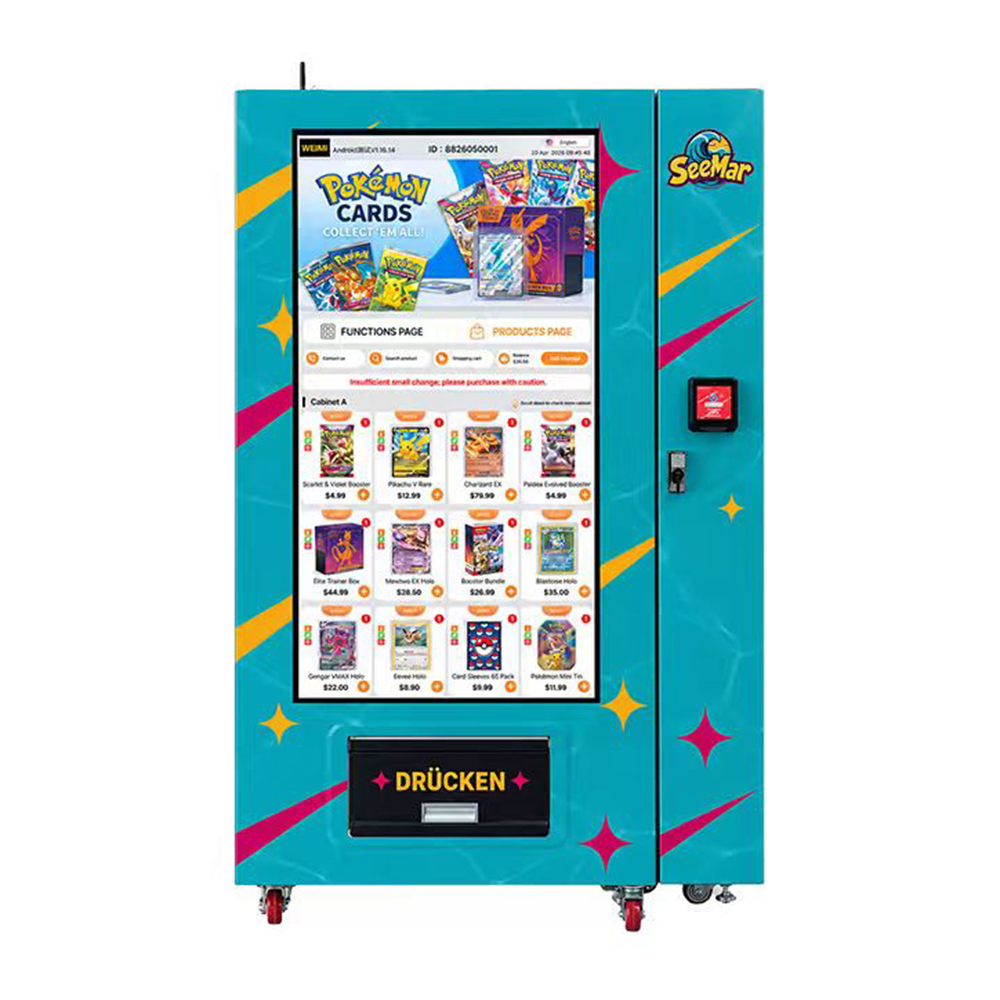
Front view of a turquoise trading card vending machine with a large portrait product catalogue, separate payment terminal, keyed service lock, lower pickup flap marked DRÜCKEN, yellow and pink star graphics and castors.
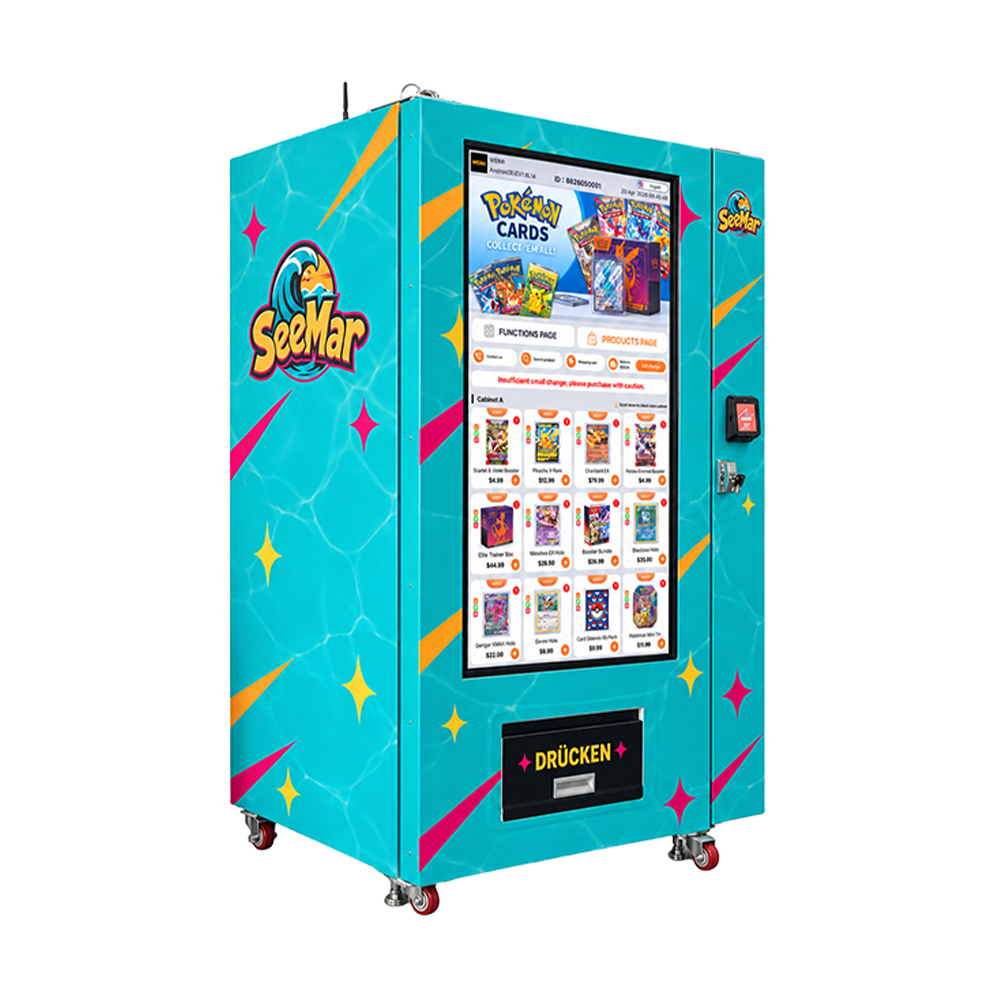
Left-side angled view of a turquoise card vending cabinet with water-pattern graphics, yellow and pink diagonal accents, SeeMar reference branding, large portrait display and lower collection opening.
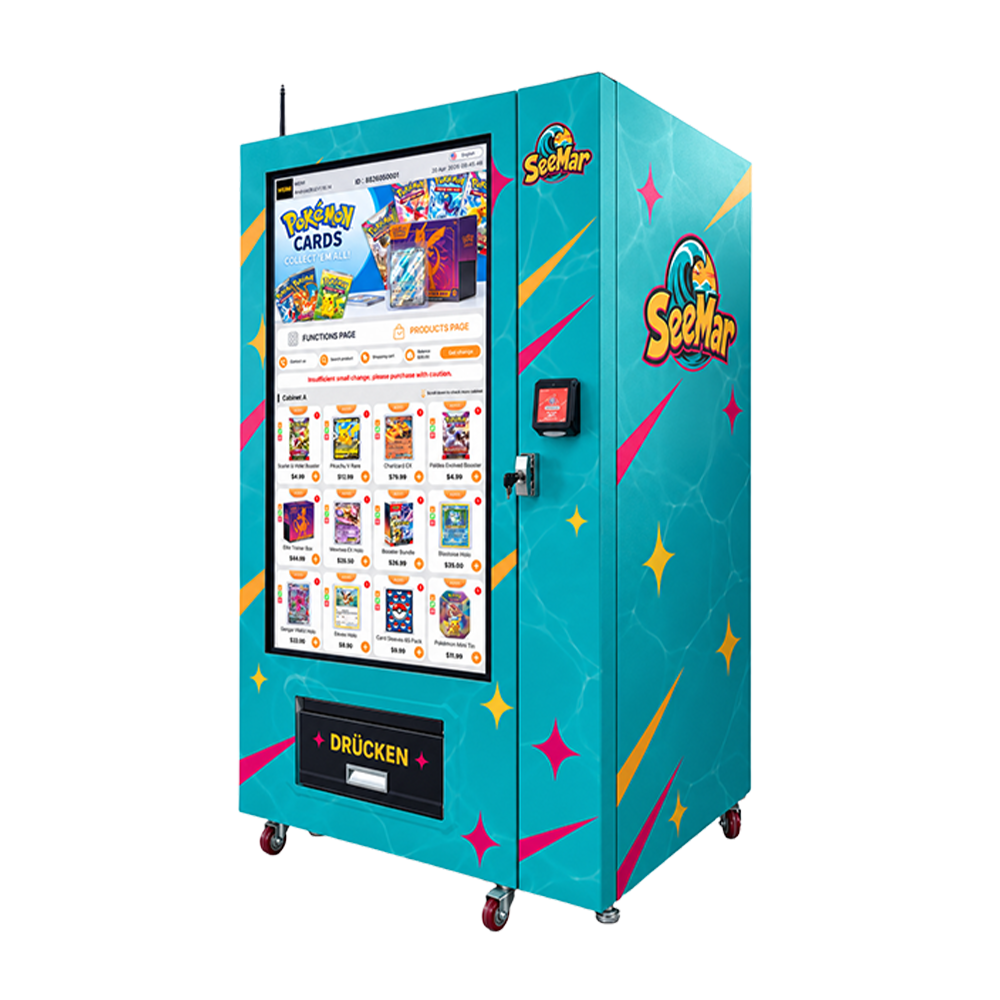
Right-side angled view of the trading card vending machine showing its turquoise side artwork, large catalogue display, separate payment terminal, keyed service lock, antenna-like projection and castor base.
Front view of a turquoise trading card vending machine with a large portrait product catalogue, separate payment terminal, keyed service lock, lower pickup flap marked DRÜCKEN, yellow and pink star graphics and castors.
Left-side angled view of a turquoise card vending cabinet with water-pattern graphics, yellow and pink diagonal accents, SeeMar reference branding, large portrait display and lower collection opening.
Right-side angled view of the trading card vending machine showing its turquoise side artwork, large catalogue display, separate payment terminal, keyed service lock, antenna-like projection and castor base.

Trading Card Vending Machine | Packs, Boxes & Remote Tools

A screen-led card shop with tested pack formats, remote tools and costs you can check.
WEIMI / CARD DROP RETAIL

Trading card vending machine.
A catalogue up front.
A real operation behind it.

The supplied turquoise cabinet puts a large portrait product catalogue at the centre of the sale, with a separate payment terminal and a lower push-marked collection flap. Pink stars, yellow accents and water-pattern artwork give it a recognisable card-shop identity.

Approve the actual retail pack

Flexible boosters, backed packs, boxes and tins can behave differently. Test complete samples in a realistic loaded position, then inspect the correct quantity and collected condition. A product thumbnail does not prove compatibility.

Make remote tasks useful

WEIMI describes general stock, price, reporting, content and alert tools. Confirm compatible electronics, enabled modules, permissions and fees. Demonstrate a refill, sale, price update and stock correction on the purchased setup.

Know what each sale leaves

Use actual goods cost, payment charges, venue terms and route effort. Compare materially different products separately or use the two-product mix tool. Calculations use buyer inputs; no demand, rare pull or resale-value return is promised.

Discuss the configured quote ↗ Manufacturer FAQ ↗
5.0
design customization

    oops...!

    no product data.

    Go to homepage
    WEIMI / CARD DROPTHE CABINET. THE CATALOGUE. THE COSTS.Build a specific quote ↗
    TRADING CARD VENDING MACHINE

    TRADING CARD
    VENDING
    MACHINE.

    A customer sees a pack, checks the offer and wants to buy. This cabinet makes the catalogue the centre of the purchase. Your job is to make sure the product behind that image fits the machine, arrives in good condition and leaves enough contribution after stock and operating costs.

    Read the actual machine ↗Try your unit economics ↗

    Turquoise water lines, pink starbursts and yellow accents come from the supplied wrap. Product names, prices and brands on the rendered screen remain reference content.

    Front view of a turquoise trading card vending machine with a large portrait product catalogue, separate payment terminal, keyed service lock, lower pickup flap marked DRÜCKEN, yellow and pink star graphics and castors.
    FRONT VIEW / YOUR SUPPLIED CABINET RENDERING
    01 / Catalogue-led purchase
    02 / Separate payment terminal
    03 / Lower collection opening
    04 / Pack-specific approval
    01 / HARDWARE YOU CAN POINT TO

    The screen leads. The physical pack still has to work.

    The images show a turquoise cabinet with a large portrait catalogue display, a separate terminal to its right, a keyed fitting and a lower pickup flap. The shelves and internal delivery mechanism are hidden, so the catalogue is not evidence of capacity or universal compatibility.

    01

    A visible digital range

    The illustrated screen puts product pictures and prices at the point of choice. That can make a focused card assortment easier to browse without a staffed counter explaining every item.

    Practical detail

    Confirm touch selection, display specification, languages and the actual software. Keep the sale unit and real stock aligned with the offer. A rendering of a product page is not a working interface demonstration.

    02

    One focused checkout point

    A separate terminal and lower pickup give the customer recognisable places to pay and collect. Test the whole sequence rather than judging the machine only by the screen.

    Practical detail

    Agree accepted methods, total-price display and issue instructions. The terminal image does not establish provider, card schemes, wallets or settlement terms. “DRÜCKEN” is a reference instruction to push, not a mechanism specification.

    03

    A catalogue you can update

    If included software supports it, digital product information can help keep the offer current as approved card products change. That may reduce a visit made only to change a label.

    Practical detail

    Demonstrate the fields, publishing rights and actual price charged. The cabinet does not prove automatic stock detection or a live link to a card supplier’s product feed.

    04

    A clear card-retail identity

    Aqua panels, pink stars and yellow slashes make this cabinet distinct. The large product interface tells people the intended category before they look for a small label.

    Practical detail

    Agree wrap rights and final branding. SeeMar and Pokémon imagery are reference content, not evidence of authorised merchandise, included licences or a supply agreement. No rare-card or resale-value promise follows from the theme.

    02 / A SALE THAT FINISHES

    Follow the selected item all the way to collection.

    Trading-card customers often care about the exact edition, quantity and sealed condition. A clear purchase flow should make that specific offer understandable and deliver it without relying on a generic category label.

    1 / Identify the actual offer

    Show product name, edition or variant, language where relevant, sold quantity and total price. A booster pack and a display box are different purchases even if their art looks similar.

    Use the exact retail unit and a supported description. If contents are unknown within a factory-sealed product, describe the published product accurately without inventing pull odds or promising particular cards.

    2 / Choose available stock

    Demonstrate how a real selection is matched to the loaded position and marked unavailable when necessary. A visible catalogue tile is not proof the machine contains that item.

    Test an empty position, a held item and a substituted variant using the supplied process. Confirm the data source for availability and how manual removals are corrected.

    3 / Pay the shown amount

    Agree the fitted provider, method, currency, merchant account and fees. Demonstrate the price the customer sees and the charge actually authorised.

    Show approval, decline, pending state and timeout. A retry should not be an uninformed second charge. Refund and vend recovery depend on the actual terminal/controller integration.

    4 / Collect the correct unit

    Observe the pack through the actual release and transfer path, then retrieve it from the lower opening. Inspect both the packaging and the goods as relevant.

    Check small flexible formats and larger rigid formats separately. A release signal does not prove correct quantity, collection or undamaged sealed condition. Ask what detection is fitted.

    Factory-sealed products and operator-made mystery packs

    They are different retail offers. This page does not establish that a machine authenticates cards, grades condition, randomises contents or verifies value. If an operator creates a pack, its sourcing, description, contents policy and destination rules need a separate review.

    Do not advertise investment returns, guaranteed pulls, guaranteed rarity or a resale value from the presence of collectible imagery. The equipment case here is selling a defined, accurately described retail unit.

    Choose the exact assortment ↗

    03 / THE PACK APPROVAL STUDIO

    Six formats. Six different handling questions.

    These are buying-test categories, not a list of guaranteed compatible stock. Open the formats you want to sell, then send actual samples and request an approved loading schedule.

    A / Flexible booster packs

    Protect the sealed retail unit.

    A slim flexible pack may bend, slip or feed differently from a rigid box. The full factory pack, backing or approved outer protection must be the test item.

    Ask for this evidence: Ask for full-position loading, single-unit release and collected-condition inspection. Do not accept a hand-placed front sample as proof of repeated operation.

    B / Sleeved or backed packs

    The backing changes the format.

    A sleeve, hanger tab or protective card can improve retail presentation but also changes stiffness, dimensions and the way the item meets the fitted mechanism.

    Ask for this evidence: Approve the exact external format, not only the booster inside it. Check tabs, edges, clearance and repeated loading orientation.

    C / Small retail boxes

    Fit includes the transfer route.

    A box can be stable in storage and still meet an awkward edge in release or collection. Dimensions and mass must include any sealed wrap or protective layer.

    Ask for this evidence: Request the actual route and inspect corners, wrap and closure after a complete sale. No gentle-transfer mechanism is established by the picture.

    D / Tins and shaped products

    Treat the shape as its own case.

    Rounded tins or irregular outlines can handle differently from a carton of similar volume. Confirm payload and clearances with the production unit.

    Ask for this evidence: Test the actual tin or shape in a realistic load. A thumbnail of a tin in the rendering is not compatibility approval.

    E / Larger collector boxes

    Do not assume screen space equals shelf space.

    The interface illustrates products of different sizes. It does not reveal the shelves, usable selections or delivery opening behind the catalogue.

    Ask for this evidence: Obtain dimensions, mass limit, approved loading and collected-condition evidence for each large format. Quote any alternative module or option explicitly.

    F / Accessories and graded items

    Use a separately approved retail format.

    Card sleeves, cases, binders or protected singles may be useful ideas, but this page does not claim the machine can deliver all of them.

    Ask for this evidence: Request an actual complete-pack test. Do not infer grading, authentication, impact protection or controlled humidity from a digital image.

    04 / YOUR STOCK, YOUR CAPITAL

    A good-looking catalogue can still tie up cash.

    Choose a focused range with a repeatable supply and an approved physical format. A machine adds a point of sale; it does not create product authenticity, guarantee demand or make every collectible profitable.

    A focused range

    Start with relevant demand, repeatable supply and approved physical formats. Review retained sales and contribution, not just high product prices. Slow variants still tie up cash.

    A traceable supply

    Keep actual supplier/product references and receipts. The cabinet does not authenticate cards, verify seals or grade condition. Brand imagery does not provide a supply agreement or licence.

    A measured release cycle

    An opening-week or release spike is not ordinary demand. Use records to adjust reorders and the offer, including older stock and supplier lead times. No collectible appreciation or guaranteed pull is promised.

    The rendered product names and prices are reference content, not included stock or a current quotation. Replace them with the actual offer.

    05 / BETWEEN-VISIT OPERATIONS

    Remote management should make the next task smaller.

    The WEIMI references describe general inventory, sales, pricing, content and status capabilities. Confirm compatible electronics, enabled modules, users, connectivity and recurring fees for this cabinet. The rendered screen alone does not establish the purchased account package.

    01

    Inventory and low-stock tools

    WEIMI describes general inventory visibility and low-stock alerts. On compatible hardware with accurate loading records, those tools can help identify the product and quantity needed before you travel.

    Practical detail

    Prepare a refill instead of making an inspection-only trip. Show load, sale, test vend and manual correction. Ask whether counts come from recorded transactions or actual fitted sensors. A dashboard cannot correct unrecorded damaged or removed stock.

    02

    Product and time reports

    Manufacturer descriptions include sales reporting by useful trading dimensions. This can help compare approved products, ordinary days and release/event activity.

    Practical detail

    See what actually earns its place. Confirm reports, filters, exports and refund handling. Compare retained sales with provider settlement and stock movement; screen taps and visitor counts are not retained unit sales.

    03

    Remote price management

    Where included, supported price changes can be handled between visits. Check contribution before a discount and confirm the customer-facing update.

    Practical detail

    Update an offer without a price-only visit. Test permissions, publishing, offline behaviour and actual charged amount. A command queued to an offline unit is not proof that its live price changed. Keep physical notices consistent.

    04

    Catalogue and content

    Supported content updates may change product names, images and descriptions. That is useful when an approved edition changes, but the actual software scope needs a demonstration.

    Practical detail

    Align product information with loaded stock. Confirm languages, fields, image workflow and what happens to an old SKU. The product picture is not proof of supplier feed integration, rights to artwork or automatic stock recognition.

    05

    Status and alerts

    Remote status and notification tools can help identify where to investigate. The value is a defined event, a responsible person and a response route.

    Practical detail

    Give somebody a useful next action. Ask which network, controller, payment or delivery events are included. Online status does not prove every item can vend, and remote advice cannot physically clear every obstruction.

    06

    Users and several machines

    If the account package supports it, central reporting and staff roles can organise work as the route grows. Begin with consistent product and site records.

    Practical detail

    Coordinate a route with clear permissions. Confirm limits, subscriptions, exports, owner access and recovery. Compare sites after their own venue charges, travel and service effort. A shared dashboard does not make every location profitable.

    Demonstrate the operator account

    Create the exact product and mapping, load known stock, find a completed sale, publish a price, correct removed/test stock and receive an included test alert. Hand over owner access, staff roles, recovery and recurring charges.

    06 / THE CATALOGUE CONTROL DESK

    One tile should mean one clear physical product.

    This board is a local buyer guide, not a connection to the machine. Open a check to plan the catalogue handover. Accurate digital information is one of the most practical advantages of a large screen when somebody owns the update routine.

    01 / Exact edition

    A card product may share artwork with another edition, language or quantity. The catalogue should use the real supplier reference and retail unit.

    Check a similar-looking variant in the sample data so the operator knows how to avoid swapping it.

    02 / Accurate picture

    Use the image for the actual sold format. A pack, tin and box are not interchangeable descriptions.

    If a representative image is used, make the actual unit clear and follow the relevant product-description rules.

    03 / Physical assignment

    Identify the selection and actual tested position. Changing the display alone does not change what is loaded.

    Demonstrate a product replacement from physical removal through the account update.

    04 / Available quantity

    Clarify how the count changes after a sale, test vend, failed delivery and manual removal.

    A provider refund may reverse money without placing an item back in usable stock.

    05 / Sold-out behaviour

    Show what a customer sees when a product is unavailable, including the behaviour while the unit is offline.

    Do not assume every empty stock state is detected by hardware.

    06 / Publication rights

    Give staff the permissions needed for stock and offer work without casually sharing owner credentials.

    Confirm who can publish price, product and availability changes and what audit history is included.

    07 / Price and currency

    Compare the total displayed with the terminal charge and account record after an update.

    An illustrated price/currency is reference content, not the final merchant configuration.

    08 / Recovery and rollback

    Know how to correct a wrong image, mapping or price and how offline changes are handled.

    Ask for a supported sequence rather than assuming a refresh solves every mismatch.

    07 / WHAT EACH SALE LEAVES

    Sales are visible. Retained contribution pays the bills.

    Use the exact retail unit, landed stock cost, payment charges and venue terms. Start with one approved product or a defensible weighted average. Run materially different formats separately.

    A sale is the start.
    What you keep pays the bills.

    Use the same unit in price, cost and sales volume. A booster pack and a box are different cases. Retained sales exclude expected refunds; include actual goods and operating costs without counting the same cost twice.

    Enter every value, including zero for charges that do not apply.

    Contribution per pack—After goods and variable charges.
    Monthly retained revenue—Quantity multiplied by selling price.
    Monthly operating contribution—After the fixed cost you entered.
    Operating break-even—Whole sold packs to cover the fixed budget.
    Simple cash payback—Only finite with positive monthly contribution.
    Retained packs per month—The volume supporting this scenario.
    Keep the assumptions visible

    Unit contribution = price − landed cost − price × (payment % + venue share %) ÷ 100 − other variable unit cost.

    Monthly contribution = unit contribution × retained daily sales × trading days − fixed monthly cost. Break-even is fixed cost divided by positive unit contribution, rounded up. Payback is initial cash divided by positive monthly contribution.

    Use one currency and tax basis. Excludes financing, tax, depreciation and changing working capital. Budget owner refill/travel/support time and plan stock cash separately.

    08 / TWO PRODUCTS, ONE OPERATING BUDGET

    Compare what sells, not just the highest price.

    Enter two actual retail units to compare their retained contribution. This is a planning calculation using one combined fee rate and one other-unit cost. It does not predict demand, pack availability or collectible resale values.

    Enter all fields, including zero where a cost does not apply.

    PRODUCT A / MONTH—Retained units × its contribution per unit.
    PRODUCT B / MONTH—Retained units × its contribution per unit.
    COMBINED REVENUE—Actual unit prices multiplied by entered retained volumes.
    OPERATING CONTRIBUTION—Both product contributions less one shared fixed budget.
    GOODS COST FOR SOLD UNITS—Only entered sold-unit cost; not opening-stock investment.
    SIMPLE PAYBACK—Initial cash divided by positive monthly operating contribution.
    Formulas and limits

    For each product: unit contribution = price − landed unit cost − price × combined percentage ÷ 100 − other variable unit cost. Multiply by its retained monthly units, add the two contributions and subtract shared fixed monthly cost.

    Simple payback uses positive monthly operating contribution; otherwise there is no finite result. The calculation excludes financing, tax, depreciation, unsold-stock write-downs and changing working capital. Use one currency and consistent tax treatment. Product mix is your assumption, not a forecast.

    09 / A PLANNED REFILL

    Availability needs a quantity and a route.

    Enter demand, visit interval, buffer, usable stock and the verified capacity for one SKU or compatible allocation. The tool does not supply a machine capacity. A target above your limit remains visible with a warning.

    Complete all five planning values.

    11 / THREE PRODUCT VIEWS

    See the cabinet from both customer and service sides.

    Supplied renderings show appearance, not the hidden interior, shipping dimensions or operating performance. Open the originals when agreeing the final unit.

    Front view of a turquoise trading card vending machine with a large portrait product catalogue, separate payment terminal, keyed service lock, lower pickup flap marked DRÜCKEN, yellow and pink star graphics and castors.
    FRONT / 870

    Catalogue and collection

    The portrait catalogue dominates the front. A separate terminal is at right and a lower pickup flap is marked DRÜCKEN. Confirm the actual selection, payment and collection sequence.

    Open original image ↗
    Left-side angled view of a turquoise card vending cabinet with water-pattern graphics, yellow and pink diagonal accents, SeeMar reference branding, large portrait display and lower collection opening.
    LEFT ANGLE / 869

    Wrap and cabinet depth

    The side shows water-pattern turquoise artwork, pink stars and yellow slashes. Agree final branding, graphic rights and service opening clearance.

    Open original image ↗
    Right-side angled view of the trading card vending machine showing its turquoise side artwork, large catalogue display, separate payment terminal, keyed service lock, antenna-like projection and castor base.
    RIGHT ANGLE / 871

    Terminal and service fitting

    The opposite angle shows the terminal, keyed fitting, side depth and antenna-like projection. Network options, lock security and internal mechanism need the final specification.

    Open original image ↗
    12 / FACTS BEFORE THE ORDER

    A specification table should answer a real buying question.

    No model datasheet accompanied the pictures. The visible screen, terminal and collection opening are useful observations. Screen size, capacity, internal mechanism and performance are configuration facts to request.

    Item Evidence and confirmation
    Machine conceptTurquoise catalogue-led trading card cabinet. Model code, final hardware and approved retail formats. Customer displayLarge portrait product catalogue illustrated. Screen dimensions, touch function, resolution, languages and interface. PaymentSeparate electronic terminal at right. Provider, accepted methods, currency, merchant account, fees and settlement. CollectionLower push-marked pickup flap. Opening size, product route, customer reach and anti-reach/security provisions if supplied. Service accessKeyed fitting visible on front-right strip. Door layout, authorisation, keys/locks and safe maintenance access. NetworkAntenna-like projection shown. Actual Ethernet/Wi-Fi/cellular options, hardware, signal needs and data fees. Cabinet graphicsAqua water pattern, yellow slashes and pink stars with reference branding. Final art, permissions, finish and replacement-wrap arrangements. BaseCastors and feet visible in views. Mass, wheel ratings, brakes, levelling, handling and installation requirements. Catalogue contentNamed card products and reference prices. Actual supply, SKU list, price/currency and mapping; no merchandise presumed included. Internal systemNot visible. Retention, release, transfer and detection on the supplied machine.
    Product handling and capacity
    Specification Evidence and confirmation
    Pack size and massNo supported range supplied. Limits for complete retail pack, including tabs or protection. Selections and quantityNo loading schedule supplied. Approved quantity by SKU and complete assortment. Screen tiles are not shelf count. Transfer protectionNo lift, belt or delivery route established. Actual mechanism and condition test with flexible and rigid formats. Delivery evidenceNo sensor specification supplied. What detects release/arrival if fitted and how failure is represented. StorageNo temperature/humidity control data. Suitability for product supplier conditions; do not infer controlled collectible storage. Speed/reliabilityNo tested figures. Representative test method, sample format and agreed acceptance.
    Installation and ownership

    Request width/depth/height, crated/uncrated mass, shipping size, handling and service-door clearance. Confirm destination voltage/frequency, rated power, grounding, network and any claimed consumption test.

    No outdoor, ingress, humidity or security rating was supplied. Confirm site limits and applicable destination documents. Agree account modules/users/fees/recovery, warranty start/term/parts/labour/freight/travel/exclusions, delivery tasks, training and acceptance.

    13 / THE LOCATION CASE

    Choose a retail need, then cost the route.

    A machine can add a point of sale near a relevant audience. It does not guarantee demand. Use the actual venue terms, access hours, service route and first-site results when judging expansion.

    Hobby or gaming venue

    A relevant audience is a starting point. Compare extra sales with existing counter sales; agree permissions, customer support and venue terms.

    Public retail or events

    Check glare, stopping space, access hours and service reach. Temporary sites add transport, setup, storage and removal costs. Wheels are not transport approval.

    Budget rent/share, utilities, account/data, parking, travel, owner time, cleaning and customer issues. A closed venue or unusable stock limits sales; no unrestricted 24-hour public access is assumed.

    15 / WHO DOES WHAT AFTER DELIVERY

    Useful service has a named job and a clear scope.

    No warranty term or response commitment was provided. The following points belong in the quote and handover instead of becoming invented promises on the product page.

    01

    Delivery and setup

    Freight arrival, unloading, positioning, utilities, connection and merchant approval are distinct tasks. A powered screen is not complete commissioning.

    Practical detail

    Assign each job and the first configured purchase test. Include access restrictions, local work and final clearance before the machine arrives.

    02

    Operator training

    Staff need the fitted instructions for loading, stock corrections, catalogue/price updates, cleaning, tests and issue tracing.

    Practical detail

    Include owner recovery, staff roles and safe service access. Changing a password once does not teach the refill and exception routine.

    03

    Payment and delivery issues

    A declined payment, pending charge and failed delivery are different cases. Give the customer a visible contact and a usable reference.

    Practical detail

    Name access/refund authority and the escalation route. Provider and equipment support may handle different parts; use their requested references.

    04

    Coverage and parts

    Agree warranty start, term, covered work and exclusions. Remote advice does not automatically include a visit or free transport.

    Practical detail

    Clarify parts, labour, freight, travel, replacement handling, spares and current service arrangements. Budget ongoing support effort in the operating plan.

    Keep a useful customer-issue record

    Use the unique machine/site, event time, product and selection reference, supported payment tracing reference, reported symptom, evidence checked and named next action. Do not share full payment details in casual messages. Correct money and stock records separately where required.

    16 / OPENING PREPARATION

    Eight agreements before the first customer.

    This local checklist counts selections while the page is open. It does not save records, submit acceptance or certify the machine.

    17 / STRAIGHT ANSWERS

    The questions worth answering before the order.

    Clear product terms, visible facts and useful answers help both a buyer and a search engine understand the page. No fictitious reviews, certificates or hidden keyword lists are used.

    Can it vend booster packs and collector boxes?

    Only formats approved on the actual configuration. Flexible packs, backed packs, boxes and tins need separate fit, release and collected-condition tests. Screen thumbnails are not compatibility evidence.

    Can I change stock and price remotely?

    WEIMI describes general inventory, price, reporting and alert tools. Confirm compatible hardware, account modules, permissions and fees with a real task demonstration.

    How much can an operator make?

    Use actual retained sales, landed stock cost, fees and venue/route expenses. The calculators show contribution and simple payback from your inputs, not forecast sales or guaranteed returns.

    FINAL PICK / YOUR CONFIGURED QUOTE

    Bring the actual packs and the venue plan.

    Send the destination, retail formats, physical samples, payment preference, site and remote tasks you want. Ask for the machine, account, setup and service together.

    A catalogue people can browse.
    An operation you understand.

    Request a drawing, loading schedule, complete purchase, confirmed connected functions and a written ownership cost list.

    Ask WEIMI for a configured quote ↗
    CARD DROP / A CLEARER RETAIL DECISION
    Sources and planning boundaries

    Appearance: buyer-supplied 870.png, 869.png and 871.png. No technical datasheet, internal route, capacity, tested performance, live payment flow or warranty term supplied. Brand/product imagery and prices are reference content, not verified supply.

    The following WEIMI references describe general connected capabilities. Confirm the actual electronics, enabled modules, account and charges for the unit ordered.

    Remote-management reference ↗Back-end management reference ↗

    Calculators run locally on buyer entries without machine access or saved input. Results are static planning calculations before financing, tax and depreciation, not sales forecasts or collectible-value promises.

    Contact WEIMI ↗Back to the top ↗
    Contact us now for a quotation
    We endeavor to give the most attentive service along with exceptional quality and value to every customer who purchases from Weimi. If you have any questions about your order, please feel free to contact us.
    Related Products
    Customer service