loading


Product
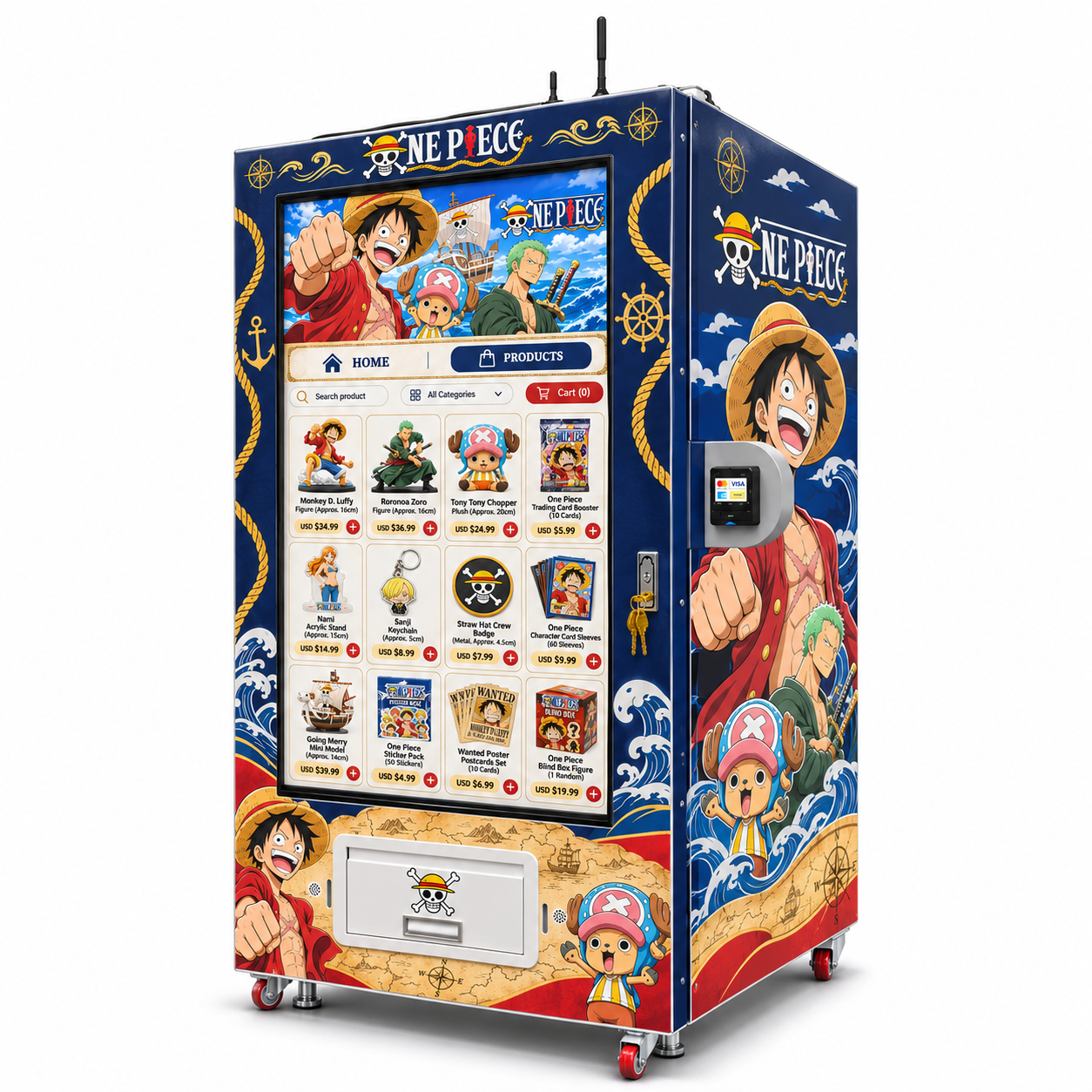
1. Right-angle view of a nautical-themed anime merchandise vending machine showing the side artwork and projecting payment terminal.
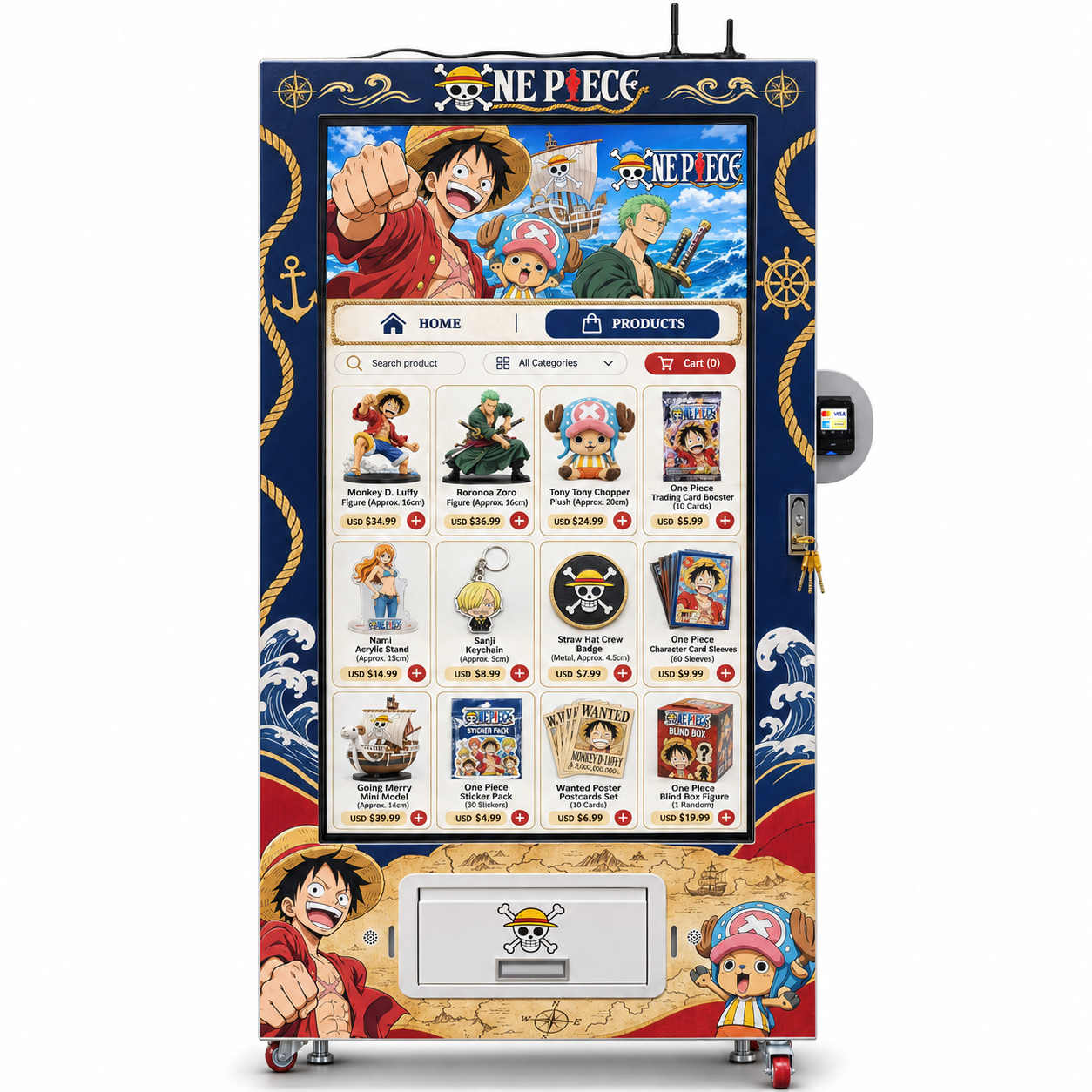
Front view of a nautical-themed anime merchandise vending machine with a large portrait display, side payment terminal and lower pickup flap.
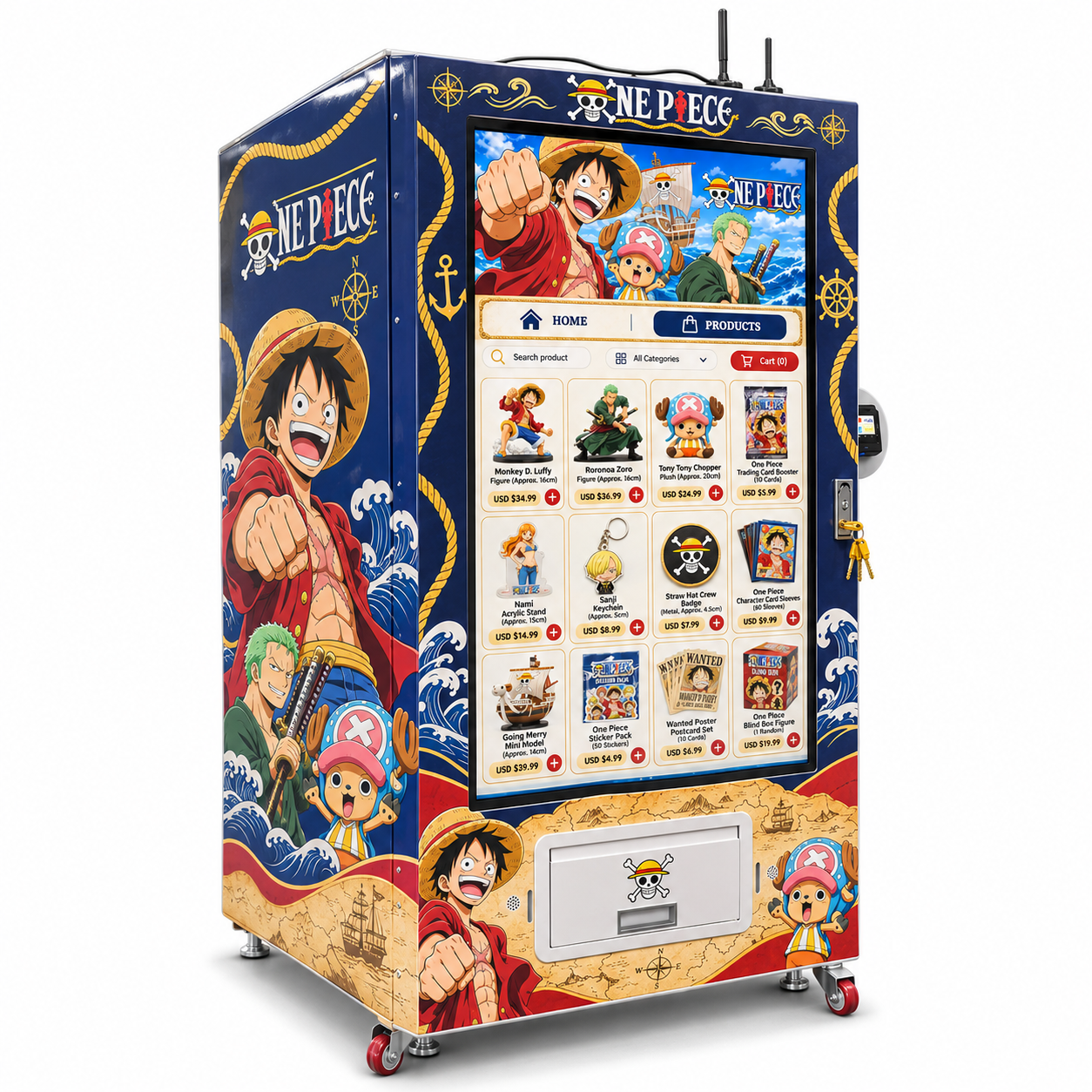
Left-angle view of a navy anime merchandise vending machine with ONE PIECE character artwork and gold nautical details.
1. Right-angle view of a nautical-themed anime merchandise vending machine showing the side artwork and projecting payment terminal.
Front view of a nautical-themed anime merchandise vending machine with a large portrait display, side payment terminal and lower pickup flap.
Left-angle view of a navy anime merchandise vending machine with ONE PIECE character artwork and gold nautical details.

Anime Merchandise Vending Machine | Nautical Theme & Remote Tools

A nautical merch storefront with tested packs, remote tools and costs you can check.

ANIME MERCHANDISE / NAUTICAL RETAIL EDITION

A character-led storefront.
With an operating plan behind it.

The supplied reference shows a deep navy anime merchandise vending machine with ONE PIECE artwork, gold rope details, waves and a parchment-map lower wrap. A large portrait catalogue fills most of the front, with a separate payment terminal on the right and a collection flap below.

01

Test the goods you will sell

Figures, plush, keychains, badges, card products and flat accessories have different packaging needs. Test the complete retail pack in its intended position and inspect delivery quantity, condition and retrieval. A screen thumbnail does not prove compatibility.

02

Make remote tools earn their place

WEIMI describes general stock, sales, price, status and content tools. Confirm the compatible controller, enabled modules, staff permissions, update behaviour and recurring costs. Demonstrate a real refill, sale and correction on the configured setup.

03

Count the retained contribution

Use actual landed goods cost, payment charges, venue terms and route effort. The detailed page includes single-product, two-format mix and capacity-aware refill tools. These use buyer inputs and do not predict demand or promise returns.

Request the configured package ↗ Manufacturer FAQ ↗
5.0
design customization

    oops...!

    no product data.

    Go to homepage
    MERCHANDISE / A NAUTICAL RETAIL EDITIONA practical buyer’s field guide

    THE LOOK BRINGS THEM CLOSER.

    Anime merchandise
    vending machine.
    Make the operation
    work for you.

    A deep navy cabinet, a portrait catalogue and a separate side payment terminal, wrapped in ONE PIECE nautical imagery. Turn that visual appeal into a clear retail offer: approved packs, accurate stock and costs you can check.

    Reference artwork shown. Final hardware, software, merchandise sourcing and artwork rights are agreed with the configured order.

    Front view of a navy ONE PIECE themed anime merchandise vending machine with portrait catalogue, side payment terminal and lower collection flap.
    THE FRONT / Catalogue above. Payment to the right. Collection below.
    01Choose an approved pack
    02Make the sale clear
    03Manage the stock
    04Keep the contribution

    01 / The cabinet, explained

    A small storefront with a clear job.

    The supplied images show an anime merchandise vending machine with ONE PIECE themed artwork. Start with what a buyer can actually see, then agree what sits behind the front panel. The wrap attracts attention; a reliable transaction is what earns the next sale.

    B / Payment sits at the side

    A separate payment terminal projects from the right side in a grey bracket. It can keep the catalogue visible while a shopper pays, but it changes the installation footprint. People need room to see and reach that terminal.

    For you: A measured layout avoids a machine that fits the drawing but blocks payment access or the walking route.

    Practical check +

    Measure the whole unit including bracket, plugs and cable bends. Stand where a customer would stand and try a payment. Confirm provider, supported methods, currency, settlement account, transaction fees and network requirements.

    C / Collection is down below

    A broad lower flap is shown beneath the display. The product has to reach this area in the correct quantity and condition. The pictures do not reveal the internal transport, shelf arrangement or protection method.

    For you: You judge the machine on the merchandise you intend to sell, rather than on an attractive catalogue image.

    Practical check +

    Run your heaviest, lightest and most awkward complete retail packs. Record loading position, delivery result and how easily the product can be removed. Confirm how a failed delivery is detected and handled on this configuration.

    Open the configuration schedule ↗Inspect the supplied views ↗

    02 / A sale, step by step

    Make the first purchase easy to finish.

    A large catalogue earns its space when the customer can understand the product, pay with confidence and collect the right item. These are the handover tests that protect the buyer from avoidable support work.

    01 / Show the actual retail item

    Use a photograph of the complete sellable pack and explain the quantity. A keychain, a set of postcards and a blind-box figure are different purchases. A character illustration by itself does not tell a shopper what will come out.

    For you: Better product expectations help reduce disputes and the time spent investigating an otherwise successful delivery.

    Practical check +

    Compare the front-screen photo, displayed name, SKU, sale price and loaded pack side by side. If a design or character varies, make that clear before payment. Keep stock photos aligned when a supplier changes the packaging.

    03 / Give a clear outcome

    After payment, the customer needs to know whether the order is accepted, where to collect and what to do if something is missing. A familiar character graphic cannot replace a readable transaction state.

    For you: A clear next step makes problems easier to resolve and helps the location host avoid becoming the default help desk.

    Practical check +

    Request the exact timeout, cancellation, payment-declined and delivery-failed screens. Confirm the customer support route and what order information a buyer can provide. Test with the intended language and local currency.

    See the acceptance route ↗Agree the support process ↗

    03 / The loading manifest

    Different merchandise needs different proof.

    The reference catalogue mixes rigid boxes, soft plush and small flat accessories. Treat every complete retail pack as its own test item. Exterior artwork and screen thumbnails do not prove that all pictured goods fit the storage or delivery system.

    M1 / Boxed figures and mini models

    A rigid box can catch on a lip or arrive with a crushed corner even when the figure inside is intact. Record the outside dimensions and loaded weight including sleeves, hang tabs and any protective carton.

    For you: The retail box is part of the customer experience; testing it protects saleable presentation and avoids avoidable refunds.

    Practical check +

    Test the proposed box at the actual loaded position. Check repeated delivery, the final few units and the condition a customer receives. Photograph corners and seals before and after. Keep large or projecting packaging off the approved list until it passes.

    M2 / Plush in its retail packaging

    Soft products can compress, spring back or expose a tag that catches. A plush character shown in the catalogue does not confirm that its loose or bagged form is suitable for this machine.

    For you: You can decide on a workable pack early, before buying a batch that needs repacking or cannot be sold through the cabinet.

    Practical check +

    Send the actual bagged product, label and closure to the supplier. Agree the loading orientation and test whether the shape changes after storage. Verify that the customer can retrieve it without pulling against the flap.

    M3 / Keychains, badges and acrylics

    Small accessories need enough structure to move predictably. Chains, hooks and loose components should stay inside a suitable retail pack. Acrylic products also need a condition check for surface scratches.

    For you: A more predictable retail pack can simplify loading and make small products easier for customers to collect.

    Practical check +

    Compare a backed pouch with the proposed box or blister. Test that exactly one unit is delivered and the small item is easy to find in the collection area. Inspect sharp or projecting packaging edges before approving the format.

    M4 / Sleeves, stickers and postcards

    Thin packs can bend or overlap, while a glossy sleeve may slide differently from a paper carton. Selling ten postcards as one set is different from selling ten individual cards. Label the exact contents.

    For you: Correct format testing helps preserve condition and keeps the stock count aligned with the number of saleable units.

    Practical check +

    Test the sealed retail set at realistic stock levels and inspect it flat after delivery. Confirm the minimum workable pack thickness, orientation and storage method with the actual mechanism; do not infer them from the cabinet width.

    M5 / Card packs and tins

    A flexible booster and a rigid tin can need different loading arrangements. Put the edition, language, pack quantity and sealed condition in the listing. Do not imply that a purchase will contain a valuable or rare item.

    For you: Clear descriptions help customers compare the offer and let you manage goods cost without relying on collectible appreciation.

    Practical check +

    Approve each pack type separately, including any hanging tab. Keep invoices and batch records for stock sourcing. If the contents are random, describe the manufacturer-sealed format without inventing odds or expected resale value.

    M6 / Blind-box merchandise

    A blind-box product needs a plain explanation of what is random and what is guaranteed in the sealed retail box. The machine should deliver the purchased pack correctly; it cannot promise which hidden design a customer receives.

    For you: You keep the retail offer understandable and separate delivery accuracy from the contents of a sealed random-design product.

    Practical check +

    Use the supplier information for collection name, quantity, age guidance and any stated assortment rules. Check the appropriate sales terms for the intended market and keep the physical box matched to the screen entry.

    Match stock to screen ↗Request internal specifications ↗

    04 / Behind the screen

    Remote tools should remove a real task.

    WEIMI describes general stock, sales, price, status, content and multi-machine management tools. Availability on this cabinet depends on the supplied electronics, software package, connectivity and account permissions. Ask to demonstrate your everyday jobs on the setup being quoted.

    S1 / See what needs attention

    If supported, a remote dashboard can help you review machine status, recent sales and stock records before leaving for a route. The useful part is deciding where a visit is needed and what to carry.

    For you: Better visibility can reduce unnecessary checking trips and make a necessary refill visit more productive.

    Practical check +

    Ask which fields are live, their update timing and how offline devices are marked. View a recent sale and compare it with the physical stock. Confirm whether any low-stock threshold is configurable per product or position.

    S2 / Keep prices and products aligned

    Supported catalogue tools may let an authorised operator update product names, prices and images. The screen and payment amount still have to agree after a change, particularly if the machine loses connectivity.

    For you: You can manage a changing offer with fewer manual edits at the cabinet when those functions are supplied and working.

    Practical check +

    Demonstrate a price change, confirm its acknowledgement on the machine and make a test purchase. Check whether scheduled changes, batch changes or remote content uploads are included before making them part of the operating plan.

    S4 / Use alerts with a response

    A low-stock or fault alert only helps if someone owns the next action. The actual sensors, fault categories and notification channels need to be specified for the configured cabinet.

    For you: An actionable alert can shorten unnoticed downtime without creating an inbox full of messages nobody uses.

    Practical check +

    List which events generate an alert, who receives it and what remains visible when communication stops. Demonstrate the notification process and agree a local response for issues that cannot be fixed remotely.

    S6 / Understand the cost of software

    A useful remote package can still include connectivity, subscription, platform or payment charges. Include those costs in the commercial comparison instead of treating the dashboard as automatically free for the life of the machine.

    For you: You compare the complete operating package and can budget for the tools you intend to use.

    Practical check +

    Request included modules, account quantity, renewal terms, update policy, export options and connectivity responsibility in writing. Separate one-off setup from recurring charges and confirm any required third-party account.

    Manufacturer: general remote-management functions ↗
    Manufacturer: general backend-management description ↗

    Test stock reconciliation ↗Define support ownership ↗

    05 / Your operating compass

    Count what a sale leaves behind.

    The machine earns revenue when a customer buys stock. What matters to the owner is the amount left after goods, payment charges, the location deal and the work of keeping it running. Use one currency consistently. None of the tools on this page predicts footfall or guarantees a return.

    Single-product contribution planner

    Use this for one product or a genuinely consistent unit average. For a mixed range, calculate each format separately or use the mix comparison below. Enter real quotation and location costs; a screenshot price is not a recommended selling price.

    Enter your figures to calculate. No sales estimate has been filled in for you.
    The unit equation

    Selling price − landed goods cost − percentage charges − other per-unit costs = unit contribution.

    The monthly equation

    Units sold × unit contribution − fixed operating costs = monthly operating contribution.

    £2 / Count route time as work

    A cabinet can sell without a staffed counter, but stock still needs ordering, transporting and loading. Screen cleaning, fault checks and customer messages also use time. Include paid labour or a realistic value for your own visits.

    For you: You can compare locations using the effort they actually require, including a busy site that needs frequent refills.

    Practical check +

    Write down the time and travel cost of one round trip. Include receiving and preparing goods, not only the minutes at the machine. Put recurring route costs in fixed monthly costs unless they are already included elsewhere.

    Compare two merchandise formats ↗Price the refill work ↗

    06 / A range, not one average

    Compare two products before you blend them.

    A small accessory can sell more often while a boxed figure ties up more cash. This simplified mix tool lets you enter monthly volumes for two formats and subtract shared fixed costs once. It assumes the same percentage charges and other per-unit costs across both products.

    Two-format monthly contribution

    Use A for one merchandise format and B for another. Landed cost belongs to each product. Combined percentage charges include payment and venue share. If fees are per order or your tax basis differs, adjust your inputs before using the result.

    Enter your figures to calculate. No sales estimate has been filled in for you.
    Review the equations ↗Revisit the first assortment ↗

    07 / Keep the cabinet trading

    Refill what will sell before the next visit.

    Stock planning needs two numbers that are easy to confuse: how much demand you want to cover and how much the approved position can physically hold. The tool leaves an over-capacity target visible so you can shorten the interval or change the plan.

    Refill target and capacity check

    Run this for one SKU and its approved position or allocation. Current stock, buffer and usable capacity are whole saleable units. Capacity comes from the configured machine and tested pack, not from the outside dimensions.

    Enter your figures to calculate. No sales estimate has been filled in for you.

    ST2 / Refill to a documented position

    Packing in more units than tested can create a problem even when the product normally works. Keep the approved orientation and maximum usable load with the operator instructions.

    For you: You protect delivery consistency while adapting the visit plan to demand.

    Practical check +

    Check the full loaded position as well as the last few units. If the demand target exceeds capacity, shorten the route interval or review the allocation; do not force extra packs into an untested arrangement.

    Reconcile the ledger ↗Plan the visit ↗

    08 / The configured order

    Ask for the numbers that decide whether it works for you.

    The reference images are useful for the look and customer-facing layout. They do not identify the hidden mechanism or technical ratings. Use this schedule to turn a visual concept into a machine package you can compare and accept.

    Item What the reference shows / why it matters What to put in the order
    Cabinet footprint A tall cabinet with a projecting right-side payment bracket is visible. Model number; width, depth and height including bracket, antenna-like projections, handles and feet; delivery weight and service clearances.
    Screen and interface A large portrait catalogue with search, categories and cart is shown. Measured screen size, resolution, touch support, operating platform, languages, accessibility options and software version.
    Storage arrangement The internal shelves, lanes and transport are not visible. Internal drawings, position count, usable dimensions, adjustable parts and which complete retail packs are approved per position.
    Delivery method A lower collection flap and handle are visible. The actual delivery mechanism, supported load range, delivery-detection method, failure states and collection sequence.
    Power and consumption An external cable is visible in angled views; ratings are not stated. Nameplate voltage, frequency, rated load, plug, grounding and installation requirements; measured energy information if supplied.
    Connectivity Projections above the cabinet are visible; they do not establish network standards. Supported Ethernet, Wi-Fi or mobile options, local coverage needs, SIM responsibility, recurring data cost and offline behaviour.
    Payment package A separate terminal shows reference payment logos. Provider, approved country and currency, supported methods, merchant account, settlement, fees, refunds and integration version.
    Temperature and environment No refrigeration, humidity control or outdoor rating is established by the images. Permitted temperature and humidity, ventilation and weather exposure limits, cleaning guidance and site conditions for the intended use.
    Access and installation A keyed fitting, castors and levelling feet are visible. Service access direction, door swing, key handover, levelling method, movement guidance and any anchoring requirement.
    Software and accounts General WEIMI backend information describes remote operating functions. Compatible controller, enabled functions, permissions, logs, data export, subscriptions, updates and account ownership.
    Wrap and merchandise ONE PIECE characters, nautical graphics and example products appear in the render. Approved artwork file and print proof; merchandise sourcing and any required rights confirmed separately; stock inclusion stated explicitly.
    Service and warranty No written service package or warranty term was supplied. Coverage period, parts and labour scope, exclusions, response channels, remote support hours, spare parts and freight responsibility.
    Turn the specification into tests ↗Prepare an enquiry ↗

    09 / Before it arrives

    Measure the whole journey, not just the floor square.

    A cabinet can fit its final space and still fail to pass a doorway or leave no room to open the service access. Make installation part of the order discussion while the configuration can still be checked.

    I2 / The customer standing area

    The side terminal projects beyond the main cabinet. Leave space for a shopper to browse, pay and collect without blocking a circulation route or standing against nearby equipment.

    For you: The cabinet is more likely to be usable in its actual setting, not only attractive in an isolated product render.

    Practical check +

    Mark the complete footprint at the site, including bracket and service clearances. Check the proposed screen and terminal reach with the venue. Confirm any local access requirements with the responsible installer.

    I3 / Utilities and the final position

    Confirm the electrical supply, network signal and cable route at the final location. Wheels visible in a render are not an instruction to move a loaded cabinet freely or leave it without proper levelling.

    For you: You avoid discovering a network dead spot or unusable cable route after the machine is fully stocked.

    Practical check +

    Follow the supplied installation procedure for moving, levelling, securing and connecting the machine. Verify the screen, terminal and backend in the final position before treating installation as finished.

    Request the rated requirements ↗

    10 / Support that can be used

    Agree who does what when a sale needs help.

    The value of service is in a workable process, clear coverage and access to the right parts or information. No fixed warranty or response time has been supplied for this reference unit; make those terms part of the quotation.

    H1 / Training for the everyday operator

    The operator needs to load approved packs, correct stock records, clean the customer areas and recognise when to stop a position or machine. Useful training follows real tasks on the delivered software.

    For you: Practical handover reduces dependence on a single person who remembers how the machine was set up.

    Practical check +

    Request a loading guide, admin guide and fault-escalation procedure in a language your team uses. Have an operator demonstrate a refill and transaction review after training. Confirm what training and follow-up are included.

    H3 / Warranty scope and spare parts

    Parts coverage, labour, shipping and on-site attendance are different promises. A machine may also use third-party terminal or network services with separate terms. Get the complete responsibility map.

    For you: Written scope makes the ownership cost easier to compare and reduces uncertainty when a repair is needed.

    Practical check +

    Ask for the coverage period, exclusions, claim steps, freight allocation, recommended spares and availability after warranty. Confirm whether software support, updates or remote assistance have renewal charges.

    Ask for the complete service quote ↗Check the handover list ↗

    11 / Reference gallery

    Read the details in the supplied views.

    These are the latest buyer-supplied renderings. They show the proposed appearance, not a tested production unit or an internal drawing. Open an original to inspect the cabinet and artwork.

    Front view of a navy ONE PIECE themed anime merchandise vending machine with portrait catalogue, side payment terminal and lower collection flap.
    VIEW 01 / FRONTThe screen-led front shows example merchandise and a cart control. Approve the actual software, stocked packs and collection process.
    Left-angle view of the nautical anime merchandise vending machine and its illustrated side wrap.
    VIEW 02 / LEFT ANGLEUse this view to understand the profile and nautical wrap. A measured drawing is needed for dimensions, ventilation and service access.
    Right-angle view of the nautical anime merchandise vending machine with projecting payment bracket.
    VIEW 03 / RIGHT ANGLEInclude the terminal bracket and a usable approach space in the site plan, along with the configured service clearance.
    Compare the configuration ↗

    12 / Acceptance, made practical

    Approve a working operation before you scale.

    Use this checklist to organise a conversation and witnessed tests. Ticking a box does not certify the machine. Store the supporting videos, documents and results with the order; the counter is only a planning aid.

    0 of 10 planning checks marked. Your selections stay only on this open page.

    Agree the support handover ↗

    13 / Straight answers

    Questions buyers should not have to guess about.

    Visible reference details and configuration-dependent functions, explained plainly.

    Q01What is this vending machine intended to sell?

    The reference presents anime merchandise in a nautical ONE PIECE themed cabinet. The screen shows figures, plush, card products and accessories. Limit the actual sellable range to complete retail packs that pass tests in the configured mechanism.

    Q02Can customers buy several items in one order?

    A cart icon is visible; multi-item payment and delivery remain unconfirmed. Test different formats, quantity changes, stock reservation, total price and partial-delivery handling if this function is included.

    Q03Which payment methods work?

    Actual methods depend on provider, country, currency, merchant account and integration. Confirm fees, settlement, refunds and connectivity for the configured terminal; reference logos are not a local payment guarantee.

    Q04Can the cabinet go outdoors?

    No outdoor or waterproof rating is established by these images. Confirm permitted exposure, temperature, humidity and ventilation in the technical sheet. The nautical wrap is an appearance choice, not weather protection.

    Q05When will it pay for itself?

    There is no fixed payback. Use actual outlay, sales, goods cost, fees, venue terms and route work. Model a quieter month as well. Simple payback is a comparison calculation, not a return guarantee or full finance forecast.

    Q07What makes an enquiry useful?

    Send the country, site conditions, retail-pack photos and measurements, payment requirements and remote tasks. Ask for a configuration, pack test plan, cost breakdown and written service scope.

    Technical questions ↗Prepare a quote request ↗

    14 / Your next move

    Request a machine you can operate, not just admire.

    Bring the product packs and operating plan into the quotation. Compare an agreed cabinet, tested range, usable payment setup, enabled remote tools and a service package with clear costs.

    A useful enquiry includes

    1. Country, currency, site details and photographs.
    2. Actual pack photos, dimensions and weights.
    3. First assortment and refill arrangement.
    4. Payment and merchant account requirements.
    5. Remote jobs, staff access and reporting needs.
    6. Installation, training and service expectations.

    Ask for an itemised response

    Request the model sheet, configuration drawing, pack-test plan, software list, payment costs, delivery scope and written support terms. Separate included items from optional modules.

    Contact WEIMI ↗

    Manufacturer FAQ ↗

    Return to the product ↗Review your figures ↗

    A clear offer. A tested pack. A workable route.

    Product basis: buyer-supplied renderings and general manufacturer software descriptions linked above. No model sheet or measured performance data was supplied. Tools use buyer inputs. Final technical values, commercial terms and service coverage are confirmed in the written order.

    Return to the top ↗
    Contact us now for a quotation
    We endeavor to give the most attentive service along with exceptional quality and value to every customer who purchases from Weimi. If you have any questions about your order, please feel free to contact us.
    Related Products
    Customer service