loading


Product
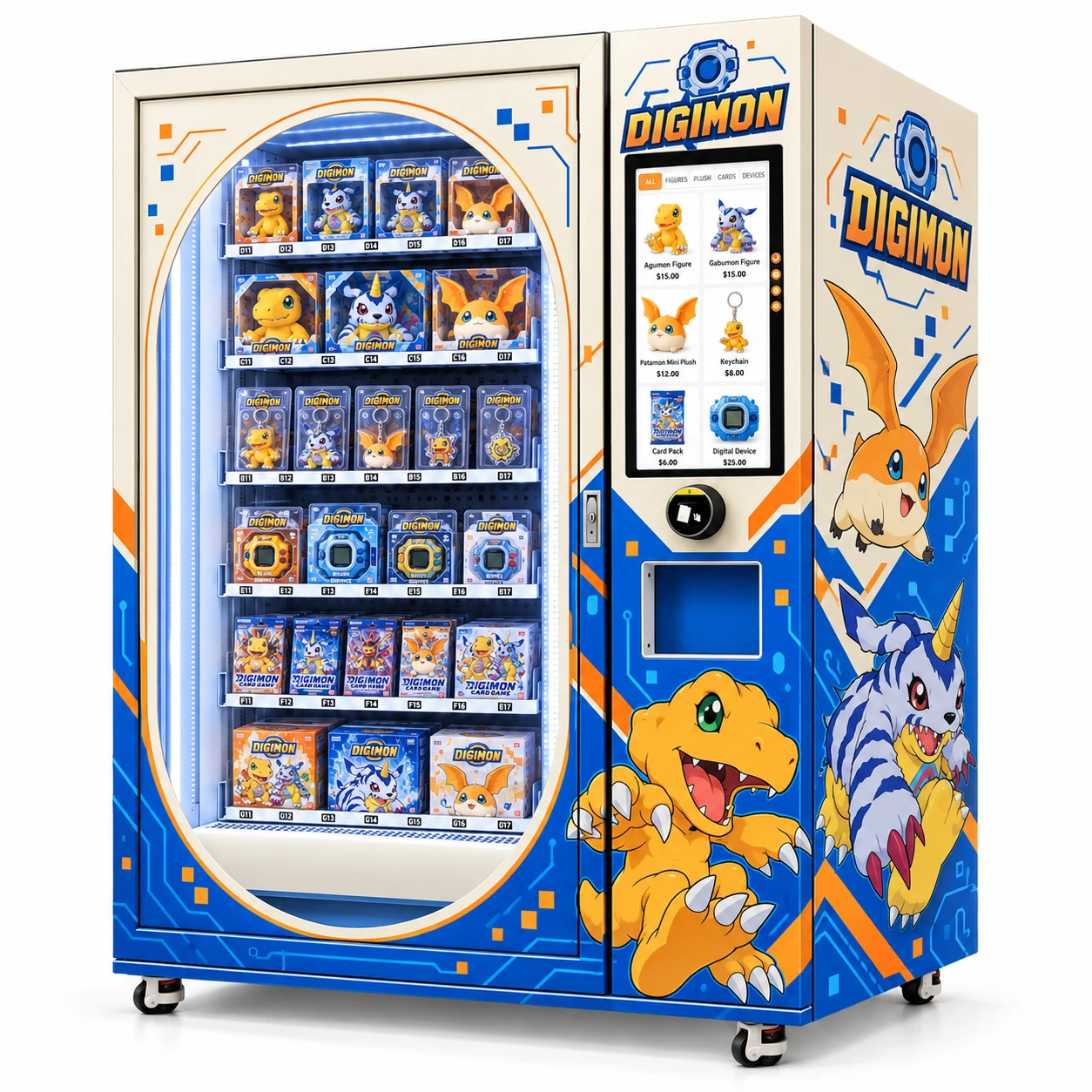
Front view of an ivory, blue and orange Digimon-themed toy vending machine with an oval illuminated product window, boxed figures and card packs, portrait selection screen, payment area and collection opening.
Left three-quarter view of the Digimon-themed collectibles vending machine, showing circuit-line graphics, large character artwork, illuminated product shelves and customer-facing controls.
Right three-quarter view of the blue-orange digital-character vending cabinet with themed side artwork, boxed collectible toys, card packs and electronic toy packages behind the display window.
Front view of an ivory, blue and orange Digimon-themed toy vending machine with an oval illuminated product window, boxed figures and card packs, portrait selection screen, payment area and collection opening.
Left three-quarter view of the Digimon-themed collectibles vending machine, showing circuit-line graphics, large character artwork, illuminated product shelves and customer-facing controls.
Right three-quarter view of the blue-orange digital-character vending cabinet with themed side artwork, boxed collectible toys, card packs and electronic toy packages behind the display window.

Digimon-Themed Toy Vending Machine | Smart Collectibles Retail

Elevator delivery, connected operations and a bold blue-orange digital-adventure exterior.

WEIMI / DIGITAL COLLECTIBLES RETAIL

A digital-adventure exterior.
A connected retail system.

An ivory, electric-blue and orange toy vending cabinet for suitable packaged collectibles. The supplied WM600-W reference specification combines elevator-and-conveyor delivery, middle auto-opening pickup and a 21.5-inch Android touchscreen.

01 / MACHINE

Configured for packaged retail

Spiral, direct-push and conveyor-belt tray options support package-led configuration. The card reader is listed as default, with cash and available e-wallet options.

02 / OPERATIONS

Connected control with practical value

Manufacturer software documentation describes sales and stock visibility, remote pricing, alerts and content tools. Use those functions to refine the offer and prioritise replenishment.

03 / BUSINESS

Contribution before expansion

Evaluate the price, merchandise cost, payment charges, venue costs and refill effort together. Use your own figures rather than a guaranteed-return claim.

WM600-W REFERENCE
W 162 × D 95 × H 195 cm
6 floors × 10–12 slots · Android 11
16 GB ROM / 2 GB RAM · 4–20°C cooling

Reference dimensions and tray layout come from the supplied platform sheet. Final installed options, software modules and service terms follow the confirmed configuration.

REQUEST A CONFIGURED QUOTATION ↗
5.0
design customization

    oops...!

    no product data.

    Go to homepage
    WEIMI / DIGITAL RETAILCOLLECTIBLES · CONNECTED · SELF-SERVICE
    Request the configuration ↗
    D-01 / DIGITAL ADVENTURE SERIES

    Retail.
    Connected.
    Evolved.

    A Digimon-themed toy vending machine that combines a vivid collectible display with a defined delivery system and connected operating tools. Put the equipment, the stock and the margin in the same retail plan.

    ELEVATOR DELIVERY / MIDDLE PICKUP
    21.5-INCH TOUCHSCREEN / REMOTE OPERATIONS
    Front view of an ivory, blue and orange Digimon-themed toy vending machine with an oval illuminated product window, boxed figures and card packs, portrait selection screen, payment area and collection opening.
    FRONT VIEW / BLUE · ORANGE · IVORY
    21.5″TOUCHSCREENAndroid-based selection
    ELEVATORDELIVERY PATHConveyor-belt transfer
    PC + MOBILEOPERATING ACCESSConnected vending system
    6 × 10–12REFERENCE LAYOUTSlots per level, not units
    ENGINEERING FOR RETAIL

    The cabinet attracts. The machine performs.

    Focus on the equipment that turns an attractive display into a completed self-service purchase: selection, payment, controlled transfer and collection.

    ◇HARDWARE / 01

    Elevator + conveyor belt

    CONTROLLED PRODUCT TRANSFER

    A guided route from the selected shelf to collection.

    The elevator-and-conveyor configuration gives packaged merchandise a defined delivery path. For boxed collectibles, how the package reaches the customer matters alongside the product itself. A mechanism selected around the retail pack helps bring presentation and dispensing into the same equipment decision.

    BUYER VALUEA complete retail journey, from visible package to retrieved purchase.
    OPEN THE ENGINEERING DETAIL

    Match the tray, package dimensions and filled weight as one configuration. Demonstrate release, transfer and collection with the real merchandise rather than relying on category names alone.

    View the platform data ↗
    ◇HARDWARE / 02

    Middle auto-opening pickup

    CUSTOMER COLLECTION

    An easier collection step with less bending.

    The reference platform lists a middle auto-opening pickup door. Raising collection above a floor-level opening makes the final step more convenient for customers and keeps the delivery point close to the touchscreen and payment area on the front of the cabinet.

    BUYER VALUEComfortable retrieval helps the self-service experience feel complete.
    OPEN THE ENGINEERING DETAIL

    Pair a clear collection prompt with the actual pickup point. The technical sheet specifies middle pickup but does not provide a collection-height measurement.

    View the platform data ↗
    ◇HARDWARE / 03

    21.5-inch touchscreen

    DIGITAL PRODUCT SELECTION

    One clear place to browse, choose and pay.

    A 21.5-inch touchscreen gives product images, prices and selection controls a dedicated customer-facing area. The physical merchandise remains visible behind the glass, while the digital catalogue helps shoppers distinguish formats and make a selection without a staffed counter.

    BUYER VALUECombine the confidence of a real display with digital selection.
    OPEN THE ENGINEERING DETAIL

    Android 11, 16 GB ROM and 2 GB RAM are listed controller specifications. Catalogue content and the available interface functions follow the supplied software package.

    View the platform data ↗
    ◇HARDWARE / 04

    Spiral / direct push / belt

    FLEXIBLE GOODS TRAYS

    Choose the mechanism around the package.

    The platform offers spiral racks, direct-push and conveyor-belt tray options. This flexibility is useful when the range combines rigid figure boxes, flat card packs and packaged accessories, each with a different shape and handling requirement.

    BUYER VALUEA product-led configuration creates more room for a coherent assortment.
    OPEN THE ENGINEERING DETAIL

    Use sealed sample packages to choose the tray mix. The reference six-level layout lists 10–12 slots per floor; usable loading and stock depth depend on the actual retail envelope.

    View the platform data ↗
    ◇HARDWARE / 05

    Card reader + market options

    PAYMENT CONFIGURATION

    Give the intended customer a practical way to buy.

    The specification lists the card reader as default and identifies bill-validator and coin-mechanism options. E-wallet support is available subject to the selected market and provider. Buyers can select the payment mix that suits the destination instead of buying unused payment hardware.

    BUYER VALUEPayment choice supports conversion while keeping configuration purposeful.
    OPEN THE ENGINEERING DETAIL

    Confirm terminal provider, accepted denominations or payment methods, settlement currency and transaction fees with the payment arrangement. The image on a screen does not set the final retail price.

    View the platform data ↗
    ◇HARDWARE / 06

    Drop detection + system control

    DELIVERY FEEDBACK

    Sensing complements the mechanical system.

    Drop-detection sensors are listed alongside the elevator and tray options. They add a delivery-detection component to the vending hardware, while MDB/RS232 names the platform interfaces used with compatible peripherals.

    BUYER VALUEUnderstand the transfer system, sensing and peripheral interfaces together.
    OPEN THE ENGINEERING DETAIL

    The reference sheet does not define retry or refund logic. Include a normal purchase, a delivery check and the relevant software response in the configured-machine demonstration.

    View the platform data ↗
    Hardware figures follow the buyer-supplied WM600-W reference sheet. The character-themed views are exterior illustrations; the ordered tray layout, fitted options and production drawings define the final unit.
    REMOTE COMMAND HUB

    See the operation. Direct the next move.

    A connected system becomes commercially useful when sales, stock and status information lead to better pricing, replenishment and service decisions.

    01 / OPERATORPC / MOBILE

    Review the platform from the operator interface.

    02 / PLATFORMAMAZON CLOUD

    The supplied reference identifies Amazon cloud infrastructure.

    03 / CABINETWI-FI / 4G / LAN

    Choose the available connection at the machine position.

    OPERATIONS WORKFLOW / INTERACTIVE EXPLAINER
    01 / SALES

    FROM TRANSACTION TO DECISION

    01 Read sales

    Review product, time and location patterns.

    02 Compare the offer

    Look at contribution alongside units sold.

    03 Refine the assortment

    Give more space to the range the site actually supports.

    A sales view is useful when it changes a stocking or pricing decision.

    02 / STOCK

    FROM STOCK SIGNAL TO REFILL

    01 Read the stock position

    Identify products approaching the refill threshold.

    02 Build the load list

    Bring the right packages for the machine configuration.

    03 Combine the route

    Plan replenishment around stock and visit cost.

    An alert is the start of an operating action, not a replacement for physical replenishment.

    03 / SERVICE

    FROM ALERT TO APPROPRIATE RESPONSE

    01 Review the event

    Distinguish payment, software and hardware issues.

    02 Use remote support where suitable

    Check the issue through the supported operating tools.

    03 Dispatch a physical visit when needed

    Bring the fault details and relevant parts information.

    Connected visibility helps target attention to the issue that needs it.

    C01 / READ THE MACHINE'S PERFORMANCE

    Sales visibility

    Review sales by product, time and location to identify which positions earn their space. Use the pattern to refine the mix and compare replenishment effort with retained sales.

    Decisions supported by machine-level trading data.CONNECT TO OPERATING VALUE ↗
    C02 / REPLENISH WITH A REASON

    Inventory & low-stock alerts

    Stock visibility and low-stock notifications help the operator prioritise the next refill. Combine the list with the route so visits carry the products that are actually needed.

    Fewer speculative checks and clearer refill priorities.CONNECT TO OPERATING VALUE ↗
    C03 / CONTROL THE COMMERCIAL OFFER

    Remote pricing & promotions

    Change prices and supported promotions through the connected platform. Evaluate discounts against contribution per item so extra units do not conceal a weaker margin.

    Update the offer with a view of unit economics.CONNECT TO OPERATING VALUE ↗
    C04 / RESPOND BEFORE A ROUTINE VISIT

    Status & fault alerts

    Machine and payment-related alerts help distinguish an operating issue from a normal refill requirement. Use remote diagnosis for suitable software issues and dispatch physical service when the fault requires it.

    More targeted attention to an unattended retail point.CONNECT TO OPERATING VALUE ↗
    C05 / KEEP THE DIGITAL DISPLAY RELEVANT

    Content & product updates

    Supported remote catalogue and screen-content updates let the operator keep the customer-facing offer aligned with the stocked range. Use accurate package imagery and current prices.

    A digital presentation that can follow assortment changes.CONNECT TO OPERATING VALUE ↗
    C06 / A STRUCTURE FOR EXPANSION

    Multi-machine oversight

    Manufacturer documentation describes management of multiple machines from a central platform. Compare individual locations and use stock, sales and service records to decide where to refine or expand.

    A common operating view for a growing network.CONNECT TO OPERATING VALUE ↗

    Software capabilities are described in WEIMI manufacturer documentation. Enabled modules, subscriptions and permissions follow the supplied software package. The workflow above explains operating use; it is not a live dashboard or a screenshot of a customer account.

    ONE CABINET / TWO CONNECTED LOOPS

    A clear path for the customer. A useful signal for the operator.

    The customer-facing hardware completes the purchase. Connected operating information helps organise what happens after the sale.

    01 / ATTRACT

    Physical display

    The ivory cabinet, blue circuit pattern and orange accents give the merchandise a distinctive visual home. LED strips illuminate the packages behind the glass.

    EXPLORE THIS MODULE ↗
    02 / SELECT

    Touchscreen catalogue

    The customer compares the actual products with the catalogue and chooses a product using the 21.5-inch touchscreen.

    EXPLORE THIS MODULE ↗
    03 / TRANSACT

    Configured payment

    The selected card, cash or available wallet arrangement completes the payment step through the hardware fitted for the destination.

    EXPLORE THIS MODULE ↗
    04 / TRANSFER

    Tray + elevator

    The appropriate tray releases the package into the configured elevator-and-conveyor transfer route.

    EXPLORE THIS MODULE ↗
    05 / COLLECT

    Middle pickup

    The customer retrieves the purchase from the middle auto-opening collection point.

    EXPLORE THIS MODULE ↗
    06 / REVIEW

    Connected operation

    Use the connected management tools to review sales, stock and operating exceptions and organise the next operating action.

    EXPLORE THIS MODULE ↗
    DATASHEET DRAWERS

    Specific hardware. Clearly separated options.

    Open a group to inspect the chassis, controller, display and payment configuration. Selection positions are separated from product-unit capacity.

    REFERENCE PLATFORM ENVELOPEW 162 cmH 195 cmD 95 cm
    SPECIFICATION BASIS

    WM600-W
    Reference configuration.

    Hardware figures follow the buyer-supplied WM600-W reference sheet. The character-themed views are exterior illustrations; the ordered tray layout, fitted options and production drawings define the final unit.

    Input voltage, rated power, net weight and warranty duration are not stated on the supplied sheet. These belong in the order-specific specification and quotation.
    01 / CHASSIS & DELIVERY 7 PARAMETERS ↓
    PARAMETER REFERENCE VALUE PRODUCT RELEVANCE
    Reference platformWM600-WTechnical basis supplied by the buyer. DimensionsW 162 × D 95 × H 195 cmReference envelope; final production drawings govern the themed configuration. Delivery systemElevator with conveyor beltA defined transfer route for suitable packaged goods. PickupMiddle auto-opening doorRaised retrieval point for less bending. Reference tray layout6 floors × 10–12 slots60–72 nominal selection positions, not a total unit-capacity claim. Tray optionsSpiral / direct push / conveyor beltChosen according to the complete retail package. DetectionDrop-detection sensorsDelivery-detection component listed on the sheet.
    02 / CONTROLLER & CONNECTIVITY 7 PARAMETERS ↓
    PARAMETER REFERENCE VALUE PRODUCT RELEVANCE
    Touchscreen21.5-inchProduct selection and customer-facing interface. Operating systemAndroid 11Listed touchscreen-controller operating system. Memory16 GB ROM / 2 GB RAMController storage and working memory. NetworkWi-Fi / 4G SIM / LANWi-Fi entry is written as 5G WIFI on the source; the cellular entry is 4G SIM. Peripheral protocolsMDB / RS232For compatible vending peripherals. Management accessMobile / PC vending systemConnected operator access through the supplied platform. Cloud infrastructureAmazon cloud server systemAs stated on the supplied platform sheet.
    03 / DISPLAY & ENVIRONMENT 6 PARAMETERS ↓
    PARAMETER REFERENCE VALUE PRODUCT RELEVANCE
    Cooling system4–20°CListed cooling range; set operating conditions around the actual merchandise. DoorTwo-layer tempered glassTransparent product-display frontage. Defogging24 V electric defoggingSubsystem voltage, not the mains-input voltage. LightingLED lighting stripsIlluminated merchandise presentation. Operating moduleEnergy-management moduleNo energy-use or savings percentage is supplied. Storage featureExtra storage shelvesStorage quantity follows the installed configuration.
    04 / PAYMENT CONFIGURATION 3 PARAMETERS ↓
    PARAMETER REFERENCE VALUE PRODUCT RELEVANCE
    Default listed optionCard readerTerminal and acquiring arrangement follow the destination. Cash optionsBill validator / coin mechConfigure for supported currencies and denominations. Wallet optionE-wallet upon availabilityProvider and market availability determine support.
    THE PRODUCT-FORMAT MATRIX

    An assortment chosen for the mechanism.

    The illustrated range suggests several packaged formats. Build the commercial mix around actual samples, suitable trays and the merchandise your location supports.

    FORMAT / 01 Boxed figures

    PRESENTATION VALUE

    Rigid retail boxes give the customer a clear view of the product presentation. Keep the box front visible and use a tray-and-transfer test to assess delivery condition.

    Fit focus
    Box width, depth, height, weight and surface friction.

    MATCH THE TRAY ↗

    FORMAT / 02 Card packs & game products

    COMPACT FORMAT

    Sealed packs and game boxes create different loading needs. A flat pack should be treated as a specific package format, with support and release matched to its dimensions.

    Fit focus
    Pack thickness, seals, base support and release behaviour.

    MATCH THE TRAY ↗

    FORMAT / 03 Keychains & accessories

    SMALLER PURCHASE OPTIONS

    Packaged accessories can add a smaller-format choice to the range. Retail packaging should contain loose rings and hanging parts so the vending mechanism handles a consistent envelope.

    Fit focus
    Hanging tabs, protrusions, outer pack and collection clearance.

    MATCH THE TRAY ↗

    FORMAT / 04 Digital toys & gift packs

    BROADER PRICE LADDER

    Electronic-toy packages and gift sets can broaden the price ladder when the size and handling requirements suit the configuration. Product mix should be tested against real retained demand.

    Fit focus
    Filled weight, inserts, protective packaging and complete delivery path.

    MATCH THE TRAY ↗

    THE MARGIN CONSOLE

    Show the economics. Use your own numbers.

    Revenue is the first line. Operating contribution is what remains after product cost, payment charges, site costs and the work needed to keep the machine trading.

    YOUR INPUTS / NO PRE-FILLED SALES FORECAST

    This local calculator uses your own costs and retained sales assumption. It is not a machine quotation or a promised return. Values are not sent anywhere or saved by this page.

    SAME CURRENCY FOR ALL MONEY INPUTS

    Enter a value in every field, including zero for charges that do not apply.

    MONTHLY REVENUE—Retained units × realised price.
    UNIT CONTRIBUTION—After merchandise and sales-linked charges.
    MONTHLY OPERATING CONTRIBUTION—Before finance, tax and depreciation.
    OPERATING BREAK-EVEN—Retained units needed per month.
    SIMPLE CASH PAYBACK—Only when monthly contribution is positive.
    12-MONTH OPERATING CASE—Monthly operating contribution × 12.
    OPEN THE COST BRIDGE
    Monthly units—
    Gross revenue—
    Variable cost per item—
    Before fixed expenses—
    Fixed monthly expenses—
    After fixed expenses—

    Automatic calculation needs page JavaScript. The visible formula cards below provide the full manual calculation method.

    The operating case assumes stable price, cost, sales and fixed expenses. It excludes finance, taxes, depreciation, growth, residual value and changing working capital. Simple payback is not a demand forecast or an accounting ROI measure. Allocate each cost once and allow for actual refunds, failed sales and downtime in retained sales.

    HOW THE MACHINE CAN EARN

    Six operating levers behind a stronger retail case.

    Connect the hardware and remote tools to the money drivers you can measure. These are operating mechanisms, not guaranteed savings or revenue uplifts.

    01 / ITEM

    Unit contribution

    Price − landed cost − price × (payment % + commission %) − other per-item costs

    A retail price is useful only after the costs linked to that retained sale have been covered.

    02 / MONTH

    Operating contribution

    Retained daily units × trading days × unit contribution − fixed monthly expenses

    Keep rent, route labour, utilities, software and the service budget in the correct fixed or variable category.

    03 / RECOVERY

    Simple cash payback

    Initial investment ÷ positive monthly operating contribution

    When contribution is zero or negative, the unchanged case has no finite payback.

    P01 / UNIT CONTRIBUTION Sell a mix with a useful margin

    A higher ticket is useful only when enough contribution remains after merchandise, payment costs and any sales commission. Compare the actual contribution of each package format before allocating more shelf positions.

    Realised selling price − landed item cost − per-sale charges.

    Track: Unit contribution after variable costs.

    PUT YOUR COSTS INTO THE CONSOLE ↗

    P02 / REPLENISHMENT Use stock data to protect availability

    A popular item cannot earn while its position is empty. Use stock visibility and low-stock alerts to prioritise replenishment, then compare the value of the next refill with the route cost.

    Availability × retained demand, assessed with visit cost.

    Track: Stockouts, stock age and units added per trip.

    PUT YOUR COSTS INTO THE CONSOLE ↗

    P03 / PRICE CONTROL Keep promotions commercially useful

    A discount can increase units while reducing the money earned on each one. Use remote pricing tools to test an offer with a contribution target, then review the result instead of judging the campaign by revenue alone.

    Additional units × new contribution, compared with the original case.

    Track: Contribution during and after the promotion.

    PUT YOUR COSTS INTO THE CONSOLE ↗

    P04 / OPERATING EFFORT Reduce unnecessary checking trips

    Connected stock and status views can help decide whether a visit is for refilling, a physical fault or routine care. Planning around that information helps make each trip more purposeful.

    Travel + labour + service cost per productive visit.

    Track: Time spent, travel expense and issues resolved.

    PUT YOUR COSTS INTO THE CONSOLE ↗

    P05 / SELF-SERVICE CHANNEL Let one cabinet perform the retail steps

    The display, selection interface, payment equipment and collection mechanism put the purchasing steps in one retail cabinet. The operator still owns replenishment and service, but does not need a staffed counter at that point of sale.

    Trading contribution after venue, service and refill costs.

    Track: Retained transactions and total operating effort.

    PUT YOUR COSTS INTO THE CONSOLE ↗

    P06 / NETWORK DISCIPLINE Expand from evidence

    Use the first machine's assortment, contribution and service records to shape the next location. Central oversight is useful for comparing sites, but each location still needs its own equipment, venue and stock-cost case.

    Site contribution − its directly attributable operating costs.

    Track: Machine-level contribution and cash tied up in stock.

    PUT YOUR COSTS INTO THE CONSOLE ↗

    OWNERSHIP SUPPORT CHAIN

    Protect the investment after delivery.

    A well-defined handover connects the machine, the operator and the service route. Use the checklist to organise the equipment-support brief without inventing a warranty period.

    S01 / OWNERSHIP

    Configuration before manufacture

    An equipment proposal should connect the product samples, selected trays, payment provider, network route and artwork. That makes the final machine a defined configuration rather than a collection of unrelated options.

    CONFIGURE / DOCUMENT / OPERATEADD TO THE ENQUIRY ↗
    S02 / OWNERSHIP

    Loading & operation at handover

    Make operator training practical: how to load the actual products, use the interface, follow stock records and recognise a collection exception. This helps the equipment become a usable operating process.

    CONFIGURE / DOCUMENT / OPERATEADD TO THE ENQUIRY ↗
    S03 / OWNERSHIP

    Remote and physical support routes

    Connected diagnostics can help identify suitable software issues; mechanical faults and replacement parts still need a physical support route. Agree who handles each type of case and what information the operator should provide.

    CONFIGURE / DOCUMENT / OPERATEADD TO THE ENQUIRY ↗
    S04 / OWNERSHIP

    Written ownership terms

    Warranty scope, excluded items, parts, labour, freight and any software subscription affect the ownership case. Put the applicable terms beside the equipment configuration so the buyer can budget the actual support arrangement.

    CONFIGURE / DOCUMENT / OPERATEADD TO THE ENQUIRY ↗
    0 / 4 OWNERSHIP TOPICS CHECKEDLocal checklist only. It is not submitted or saved.

    The support topics above define what to request with the configured equipment. Actual included services, warranty duration, response commitments and subscription charges are specified by the supplier quotation.

    BUYER FAQ

    Direct answers about the equipment and operation.

    Machine functions, cloud tools, stock handling and the commercial model — the questions that matter to the buyer.

    01What makes this a toy-retail machine rather than a decorated cabinet?

    The reference equipment combines a physical product display, touchscreen selection, payment hardware and an elevator/conveyor delivery route. The themed exterior creates the visual identity; the configured mechanisms perform the retail transaction.

    OPEN THE RELEVANT MODULE ↗
    02Why use elevator delivery for collectibles?

    A defined transfer route is relevant when the product and its retail packaging both matter. Match the tray and transfer system to the sealed package and inspect its condition after the complete delivery demonstration.

    OPEN THE RELEVANT MODULE ↗
    03How many products can I offer?

    The WM600-W reference sheet lists six floors with 10–12 slots each: 60–72 nominal selection positions. Different package sizes and loading layouts change the final mix and total number of units.

    OPEN THE RELEVANT MODULE ↗
    04What can I see through the remote system?

    Manufacturer software documentation describes sales, stock and machine-status visibility, including low-stock and fault alerts. Reports and enabled modules should be demonstrated for the software package supplied with the machine.

    OPEN THE RELEVANT MODULE ↗
    05Can prices and screen content be changed remotely?

    WEIMI documentation describes remote pricing, supported promotions and content updates. Confirm user permissions, the update process, subscriptions and connectivity for the quoted platform.

    OPEN THE RELEVANT MODULE ↗
    06Does the system remove the need to visit the machine?

    Physical products still need replenishment, cleaning and appropriate service. Connected information helps plan those visits and distinguish a refill requirement from an issue that needs technical attention.

    OPEN THE RELEVANT MODULE ↗
    07Can the machine trade around the clock?

    Self-service equipment can support trading during the hours the host site permits access. A 24-hour location can offer a wider selling window; the actual schedule depends on venue access and the operating arrangement.

    OPEN THE RELEVANT MODULE ↗
    08How do I work out break-even and payback?

    Enter your own price, merchandise cost, expected retained sales, variable charges, fixed expenses and initial investment in the margin calculator. It calculates contribution and simple payback; it does not predict demand.

    OPEN THE RELEVANT MODULE ↗
    09What is included in the illustrated merchandise?

    The supplied images show example figures, card packs, accessories and digital-toy products. Merchandise stock is separate from equipment unless the quotation expressly includes the specified products and quantities.

    OPEN THE RELEVANT MODULE ↗
    10Which details must come from the final quotation?

    Confirm the installed tray layout, payment arrangement, production dimensions, input power, weight, software modules and service terms. The supplied sheet is a reference platform specification and does not state every order-specific detail.

    OPEN THE RELEVANT MODULE ↗
    YOUR NEXT CONFIGURATION

    Turn the visual concept into a specified retail system.

    Share the destination, target packages, desired payment route and operating plan. Connect the machine configuration with the software package and written support scope.

    PRODUCT SAMPLES / PAYMENT / NETWORK / SOFTWARE / SERVICE

    Request the final datasheet, configured-software demonstration and quotation. Use your own landed costs and site assumptions to evaluate the operating contribution before expanding the concept.

    Contact us now for a quotation
    We endeavor to give the most attentive service along with exceptional quality and value to every customer who purchases from Weimi. If you have any questions about your order, please feel free to contact us.
    Related Products
    Customer service
    detect