loading


Product
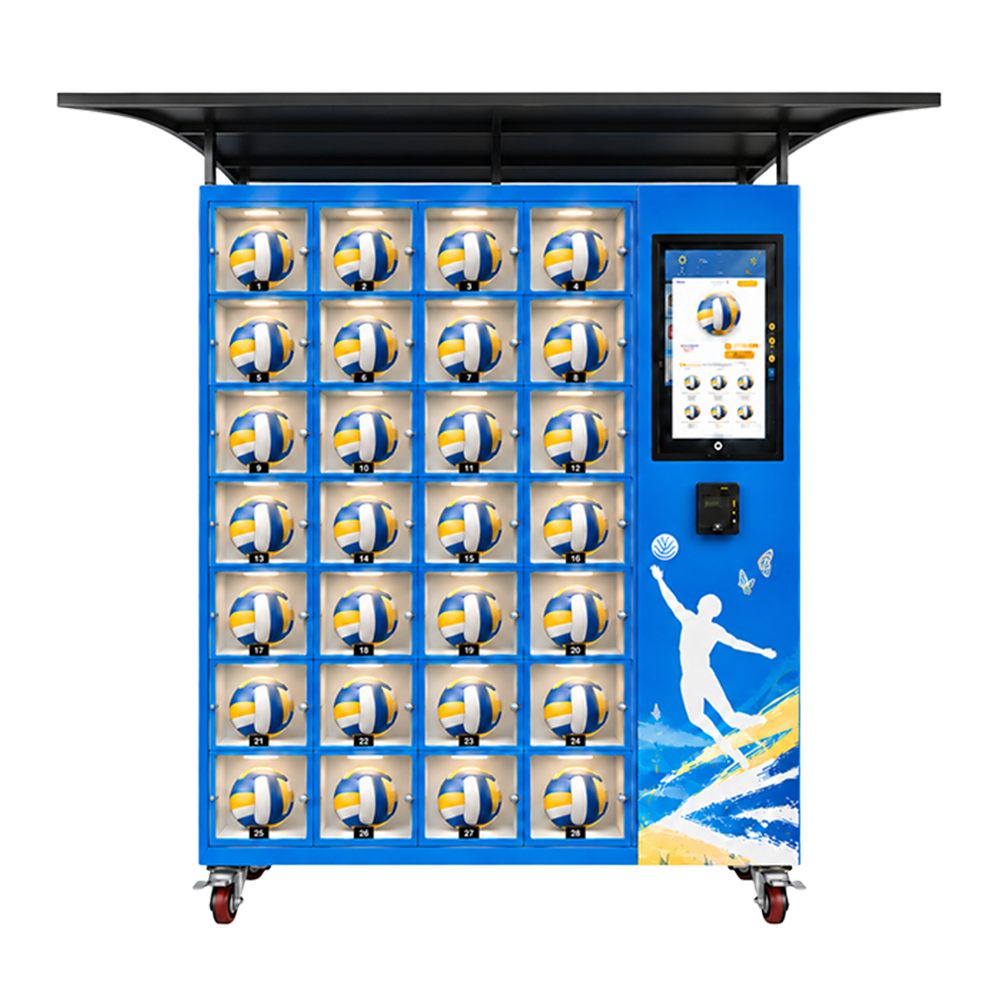
Front view of a blue beach volleyball vending cabinet with 28 numbered transparent-front compartments in four columns and seven rows, a portrait product screen, separate payment terminal, overhead canopy and castors.
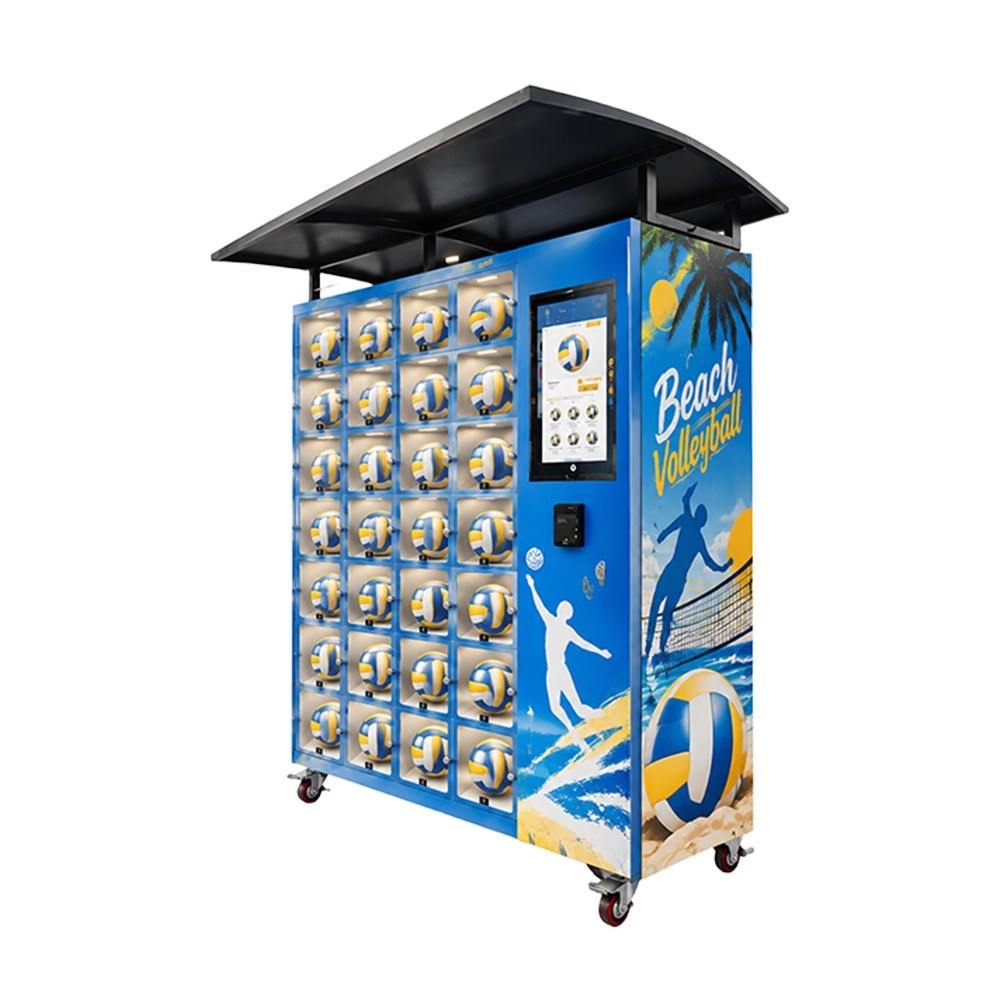
Right-side angled view of a blue beach volleyball vending machine with yellow-and-white sports graphics, palm tree, player, ball compartment grid, portrait screen and overhead black canopy.
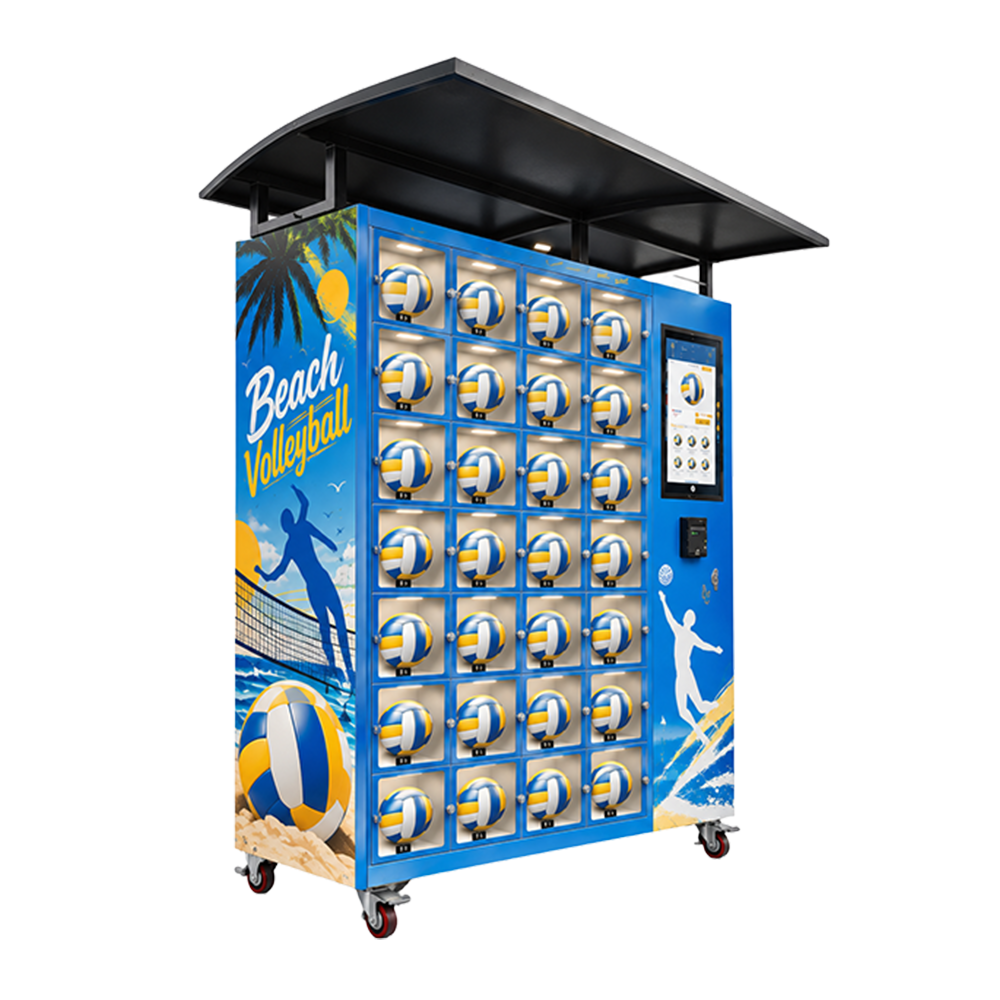
Left-side angled view of the beach volleyball vending cabinet showing its compartment grid, blue and yellow beach graphics, portrait interface, payment terminal, canopy and castor base.
Front view of a blue beach volleyball vending cabinet with 28 numbered transparent-front compartments in four columns and seven rows, a portrait product screen, separate payment terminal, overhead canopy and castors.
Right-side angled view of a blue beach volleyball vending machine with yellow-and-white sports graphics, palm tree, player, ball compartment grid, portrait screen and overhead black canopy.
Left-side angled view of the beach volleyball vending cabinet showing its compartment grid, blue and yellow beach graphics, portrait interface, payment terminal, canopy and castor base.

Beach Volleyball Vending Machine | Compartment Ball Sales

A courtside cabinet with numbered ball compartments, portrait interface, payment terminal and canopy
WEIMI / COURTSIDE EQUIPMENT

Beach volleyball vending machine.
A visible ball offer, close to play.

A group arrives ready to play, but nobody brought a ball. This illustrated blue cabinet gives the offer a recognisable place: numbered transparent-front compartments, a portrait product interface and a separate payment terminal, with Beach Volleyball graphics in blue, yellow and white.

01 / Check the whole purchase

The door layout suggests collection from an individual position. Demonstrate the actual selection, charge, correct-door access, ball removal and closing. A command or open-door event does not automatically prove the ball was collected.

02 / Use remote tools with a purpose

WEIMI describes general sales, stock, pricing and alerts. Confirm compatible electronics, enabled modules and fees. These tools can help prepare work between visits; remote unlocking and ball-presence sensing need separate evidence.

03 / Work out what each sale leaves

Use landed ball cost, payment fees, venue terms and realistic route effort. Compare quieter periods with busier trading instead of treating a sunny weekend as a year. The detailed page includes buyer-entered contribution, seasonal and refill tools.

Discuss the configured machine ↗ Manufacturer FAQ ↗
5.0
design customization

    oops...!

    no product data.

    Go to homepage
    WEIMI / COURTSIDEEQUIPMENT FIRST. A CLEAR PLAN TO PLAY.Build your quotation ↗
    BEACH VOLLEYBALL VENDING MACHINE

    BEACH VOLLEYBALL
    VENDING
    MACHINE.

    A group is ready to play, but nobody brought a ball. This compartment-style cabinet puts the illustrated product right in view. For you, the buying decision is practical: confirm how a paid selection opens the right door, how stock is recorded and what remains after site and service costs.

    Inspect the cabinet ↗Work through the numbers ↗

    Blue court energy. Yellow ball panels. White net lines. A guide to the supplied machine, with no assumed rental or return system.

    Front view of a blue beach volleyball vending cabinet with 28 numbered transparent-front compartments in four columns and seven rows, a portrait product screen, separate payment terminal, overhead canopy and castors.
    FRONT VIEW / SUPPLIED PRODUCT RENDERING
    04 × 07Visible compartment layout
    PORTRAITIllustrated customer screen
    SEPARATEPayment terminal area
    CONFIRMSale, access and stock logic
    SET 01 / READ THE HARDWARE

    A visible ball offer, with individual collection positions.

    The supplied views show seven rows of four numbered transparent-front compartments, each illustrated with a volleyball. A portrait display and separate payment terminal sit on the right. Above is a projecting black canopy; below are castors.

    01 / See the product before choosing.

    Separate front compartments let customers recognise the ball and its position. That can make a focused sports offer easier to understand than a long hidden catalogue.

    Practical check

    Check glare, labels, ball description and price at the venue. A rendering does not establish panel material, impact rating or how the screen maps to each physical position.

    02 / Collect from the selected position.

    The layout suggests individual door access rather than a ball travelling through a shared drop chute. That can suit a round product when the access sequence is correctly configured.

    Practical check

    Demonstrate payment, the intended door releasing, ball removal and closing. The pictures do not prove electronic lock type, door sensing or automatic collection verification.

    03 / Keep the controls easy to find.

    The portrait display and terminal are visually separate from the ball grid. The rendered screen shows a product page, giving the customer a clear place to start.

    Practical check

    Confirm touch input, screen size, languages, price display and accepted methods. A product image does not establish operating system, resolution or provider integration.

    04 / A clear identity near play.

    Blue panels, yellow-and-white balls, player silhouettes and beach graphics tell people what this retail point is about. The canopy is part of the visible silhouette.

    Practical check

    Agree final graphics and readable transaction instructions. A roof does not establish rain sealing, wind resistance, UV protection or outdoor approval.

    SET 02 / FOLLOW THE PURCHASE

    Make collection understandable, then test the exceptions.

    A useful sales feature is a purchase people can finish. Agree the configured sequence before opening, including what happens when a payment succeeds but access does not.

    1 / Recognise the ball.

    Show the actual product, condition, price and sold unit. Use real photos when stock differs from the rendering, and make clear whether ownership is transferred.

    A shopper should not guess whether this is an inflated ball, a display sample or a rental. State any included packaging. Do not claim a brand or sporting certification from the picture.

    Check the configuration ↗

    2 / Choose and pay.

    Identify an available product or position, show the amount due and explain the fitted payment method. Demonstrate the actual interface rather than a static screen image.

    Test a normal charge and a decline. Agree timeout behaviour, pending selections and how the configuration avoids conflicting purchases of the same stock.

    Check the configuration ↗

    3 / Open the right door.

    The customer needs an understandable position reference and an opening they can use. Check this with the installed lock and any fitted indicator.

    A command sent, lock released, door opened and ball removed are different events. Ask which ones the hardware actually records and how they affect stock.

    Check the configuration ↗

    4 / Find help when needed.

    Display an operator contact and explain the issue reference. Support for a payment question may involve different people from support for a locked compartment.

    Agree the person authorised to provide access or a refund. A success message alone does not settle whether the customer received the right ball.

    Check the configuration ↗

    Retail sales and rental are separate business models

    This page treats the machine as a retail concept subject to its final purchase flow. Individual doors do not prove timed hire, deposits, return recognition, damage checks or automatic refunds. A rental requirement needs a separately defined and demonstrated package.

    Rental also needs people and rules for late, missing or damaged balls. Do not use a retail unit-margin calculation as hire income without modelling the complete return cycle and losses.

    Define the supplied scope ↗

    SET 03 / OPEN THE INSPECTION BOARD

    28 visible positions. 28 useful buying checks.

    The tiles below are a buying guide, not a live controller or a map of machine telemetry. Open one to inspect a practical point. Individual sensors and remotely controlled locks are not assumed.

    01 / Selection mapping

    Show that the selected product or reference opens the intended compartment. Repeat after refill and after a position is unavailable. Wrong mapping creates a customer issue even if payment and a lock command work.

    02 / Highest-row reach

    Use a top position in the test and consider realistic customer reach and destination access requirements. No compartment height or accessibility certificate was supplied.

    03 / Clear opening

    Measure usable clearance including the hinge, fittings and door movement. Test at the intended inflation state. A panel dimension is not the same as the opening a ball must pass through.

    04 / Ball removal

    Retrieve the actual retail ball without forcing the door or scraping it. Use any included packaging. A large round item should not need to fall into the public approach to be collected.

    05 / Door closing

    Demonstrate normal closing and the response to a door left open. Identify any installed state sensor. A lock command is not evidence that a door has physically latched.

    06 / One sale unit

    Confirm whether a position carries one ball or another approved unit, and test that exact loading. One illustrated ball does not establish capacity for other formats.

    07 / Stock update

    Trace a completed purchase and ask when stock decreases. Explain access without collection where supported. Door opening and product removal need not mean the same thing in the counter.

    08 / Empty handling

    Make a test position unavailable and try to select it. Demonstrate how refill restores availability. A known-empty position should follow the configured sale-blocking rule.

    09 / Pending selections

    Test an abandoned selection and a pending payment. Ask how long a position is reserved. Avoid assigning one stocked ball to conflicting transactions.

    10 / Payment decline

    Run a decline with the fitted provider and observe screen instructions and access behaviour. A decline should be distinguishable from an authorised charge or machine fault.

    11 / Paid but closed

    Use the agreed safe test for payment without access. Trace the event and support procedure. Define retry, assistance and refund responsibility instead of assuming automatic recovery.

    12 / Open but uncollected

    Ask how the actual hardware represents opening without removal, if it can distinguish that state. Lighting and transparent panels do not prove ball-presence detection.

    13 / Staff access

    Show authorised service access to the compartment and lock. Keep it separate from customer access. The public door layout is not a maintenance drawing.

    14 / Known refill

    Load a known quantity through the normal account process and check the availability change. Physical loading and software records should use the same sold unit.

    15 / Variant change

    Update an approved ball variant, product image and price at the correct position. Retest fit where needed. Similar appearance does not establish the same size, cost or offer.

    16 / Price consistency

    Publish a supported price change and compare the display, charge and sale record. Remote pricing helps only when customer information agrees with the amount charged.

    17 / Network loss

    Ask for the supported offline sequence and supplier-approved connection interruption test. Offline payments and cached access are configuration-dependent.

    18 / Restart recovery

    Agree a safe interruption and restart test, then check pending payment, access and stock state. Do not assume a restart resolves every interrupted purchase.

    19 / Staff permissions

    Test included operator and administrator roles for stock, pricing and access changes. Enough permission to work does not require sharing every owner credential.

    20 / Remote commands

    Ask whether remote access commands exist, are restricted and are logged. Quote them separately. Management reports do not automatically include remote unlocking.

    21 / Status meaning

    Review actual fault and online events and identify the source controller or sensor. An online unit can still have a payment problem or unusable position.

    22 / Operator contact

    Test the contact displayed on the cabinet and find the customer transaction reference. A practical contact route reduces time spent reconstructing an issue.

    23 / Panels and seals

    Inspect edges, transparent fronts, hinges and fitted seals. Request material and environmental data. The renderings do not establish impact strength or salt-air protection.

    24 / Cleaning procedure

    Show approved cleaning around the display, terminal, doors and electrical areas. Sand and moisture need the equipment instructions rather than guessed treatment.

    25 / Canopy envelope

    Measure overhang, installed height and service space, including separately shipped components. Cabinet footprint alone does not describe the canopy clearance.

    26 / Base stability

    Check castor rating, brakes, levelling or anchoring and the final approved surface. Wheels do not establish road-transport suitability or wind resistance.

    27 / Test reconciliation

    Correct test purchases and manual removals, then record remaining usable stock. Unrecorded test access can distort the first public trading count.

    28 / Written acceptance

    Keep the configuration, sample-test result, account scope and service contacts with the unit. A repeatable acceptance record is more useful than assuming every illustrated feature is included.

    SET 04 / MEASURE COMPLETION

    Ask for the whole purchase, not just an opening door.

    No success rate, access speed or uptime figure was supplied. A useful test uses the actual ball, fitted software and payment package, with written criteria for completion.

    1. Load the actual approved ball and complete a selection, charge, correct-door opening, collection and closing.
    2. Repeat representative high, middle and low positions; check reach, clearance and the final stock record.
    3. Demonstrate known-empty selection, a declined payment and the approved paid-but-no-access case.
    4. Use supplier-approved connection/restart tests; explain pending transactions and recovery.
    5. Load a known refill, publish a supported price and reconcile test transactions before public trading.

    Keep the configuration, test conditions, acceptance result and unresolved tasks. No numerical speed, reliability or uptime claim was supplied.

    Open the 28 buying checks ↗
    SET 05 / CONNECTED OPERATIONS

    Remote tools should make the next task clearer.

    WEIMI describes general stock, sales, pricing, alerts and multi-unit capabilities. Confirm compatible electronics, enabled modules, network hardware and fees for this cabinet before treating a feature as included.

    01 / Stock and availability

    WEIMI describes stock visibility and low-stock alerts. On compatible hardware, these may help identify what needs attention before a visit.

    Practical check

    Prepare a useful refill. Demonstrate whether the record means a ball count, door state or sale event. Reconcile manual removals instead of assuming a physical sensor count.

    02 / Sales reports

    Product, time and machine reports can help review recorded demand near courts where events and weekends affect trading.

    Practical check

    See when the point is useful. Confirm filters, exports and refunds. Compare retained sales with settlement and refill records; one weekend does not forecast the next.

    03 / Remote pricing

    Included remote pricing may avoid a visit made only for a commercial update. Check contribution before discounting.

    Practical check

    Make controlled changes. Test permissions, offline behaviour, displayed amount and actual charge. Keep physical signs consistent.

    04 / Status and alerts

    Manufacturer material describes remote status and alerts. A message helps when the responsible person can act on it.

    Practical check

    Assign a useful next action. Confirm which controller, payment and compartment events exist. Online status does not establish a sensor in every door or automatic repair.

    05 / Catalogue updates

    Supported content tools may update the product image, description and price when an approved ball variant changes.

    Practical check

    Keep the offer accurate. Confirm editable fields, languages and publishing. The rendered display does not establish a particular CMS or touchscreen specification.

    06 / Multiple sites

    Included multi-unit tools can help compare sites and prepare work using consistent records.

    Practical check

    Coordinate the route. Confirm users, limits, subscriptions and account recovery. Compare locations after their own venue, travel and service costs.

    SET 06 / THE REAL PRODUCT

    The ball is part of the configuration.

    Pictures show blue, yellow and white volleyballs. They do not establish brand, material, certification, inflation pressure or included stock. Approve the actual product in its intended retail condition.

    01 / Size and inflation

    A partly deflated sample may fit differently from the ball a customer takes straight to the court. Check usable space and the opening.

    Record the approved model, dimensions and inflation condition. Agree whether it is ready to play and who prepares it.

    Check the configuration ↗

    02 / Condition and claims

    State the real product and included packaging. A beach graphic is not a sporting approval.

    Use verified supplier facts. Do not infer competition grade, branded stock or material from a rendering.

    Check the configuration ↗

    03 / One sold unit

    Price, stock and costs should refer to the same unit. If one ball is supplied per position, use that definition consistently.

    A bag, pump or outer pack changes fit. Approve the complete bundle rather than treating it as the same loading case.

    Check the configuration ↗

    04 / Variants and mapping

    Different grades have different costs and demand. Keep the image, selection and loaded position aligned.

    Demonstrate removing old stock and publishing a replacement. Retest fit and update the offer instead of substituting silently.

    Check the configuration ↗

    SET 07 / A REASON TO BUY

    Choose a point where a missing ball is a real need.

    A court gives context; attendance is not sales. Look for an actual purchase occasion, permission, space to stop and an affordable service route.

    A / Beach sports venue

    A group without a ball is a specific purchase occasion. Check the visitor route and existing equipment counter.

    Agree retail rights, hours, venue share and help. Request environmental approval for the exact location.

    Check the configuration ↗

    B / Resort recreation

    The offer can sit near where guests play, when access, stock and suitable payment are in place.

    Confirm languages and support. Room charging requires a separately demonstrated integration.

    Check the configuration ↗

    C / Sports centre

    A suitable retail point may serve casual players beyond counter hours. Check existing sales and support access.

    Distinguish new sales from purchases moved from another checkout. Agree security, access and operator contact.

    Check the configuration ↗

    D / Seasonal event

    An event can trial the offer, but transport, setup and removal can consume a short season’s margin.

    Confirm handling, mass, canopy, utilities and leftover stock. Castors are not transport or stability approval.

    Check the configuration ↗

    SET 09 / WHAT EACH SALE LEAVES

    A sales total is only the start.

    Use actual ball cost, payment fees and venue terms. This models retail units, not deposits, late fees, returns or repeated hire of one ball.

    A sale is the start.
    What you keep pays the bills.

    Use one sold ball as the unit for price, cost and volume. If you sell an approved bundle, use that complete bundle throughout. Calculate materially different variants separately.

    Enter every value, including zero for charges that do not apply.

    Contribution per ball—After goods and variable charges.
    Monthly retained revenue—Quantity multiplied by selling price.
    Monthly operating contribution—After the fixed cost you entered.
    Operating break-even—Whole sold balls to cover the fixed budget.
    Simple cash payback—Only finite with positive monthly contribution.
    Retained balls per month—The volume supporting this scenario.
    Keep the assumptions visible
    Per ball
    Price − landed cost − price × (payment % + venue share %) ÷ 100 − other variable unit cost.
    Monthly contribution
    Unit contribution × retained balls per day × trading days − fixed monthly cost.
    Operating break-even balls
    Fixed monthly cost ÷ positive unit contribution, rounded up to a whole ball. Not reached if unit contribution is zero or negative.
    Simple payback months
    Initial investment ÷ positive monthly contribution. Otherwise there is no finite payback.

    Use one currency and tax basis. Results exclude financing, tax, depreciation and changes in working capital. Plan inventory cash and settlement timing separately. Include owner refill, travel and support effort in costs.

    SET 10 / THE WHOLE PLAYING SEASON

    A sunny weekend is not a year.

    Compare busier and quieter periods using the main unit contribution and monthly fixed cost. These are your assumptions, not forecasts of weather or ball demand.

    Complete the main cost plan and these seasonal assumptions.

    Annual retained balls—Busier-month units plus other-month units.
    Annual operating contribution—Annual unit contribution less twelve months of entered fixed cost.
    Indicative simple payback—Initial cash divided by positive annual contribution, shown in years.
    Where the seasonal result comes from

    Annual retained balls = busier months × busier trading days × busier daily balls + the remaining months × other trading days × other daily balls.

    Annual operating contribution = annual retained balls × the main plan’s unit contribution − twelve × the entered fixed monthly cost. Indicative simple payback is initial cash divided by positive annual contribution; there is no finite result if that contribution is zero or negative.

    Return to the unit cost assumptions ↗

    SET 12 / STOCK WITHOUT GUESSING

    Use verified space, not a picture count.

    Enter demand, interval, buffer, usable stock and confirmed capacity for the allocation. The tool does not assume 28-ball capacity. A target above the limit remains visible with a warning.

    Complete all five planning values.

    SET 14 / THREE VIEWS

    Inspect customer and service sides.

    These supplied renderings explain appearance and visible layout. They do not replace production drawings or a configured-machine test.

    Front view of a blue beach volleyball vending cabinet with 28 numbered transparent-front compartments in four columns and seven rows, a portrait product screen, separate payment terminal, overhead canopy and castors.
    FRONT / 867

    Read the grid

    Four columns and seven rows are visible. Confirm mapping and how payment gives access.

    Open original image ↗
    Right-side angled view of a blue beach volleyball vending machine with yellow-and-white sports graphics, palm tree, player, ball compartment grid, portrait screen and overhead black canopy.
    RIGHT ANGLE / 865

    Check the canopy

    Request full canopy envelope, installation method and site limits.

    Open original image ↗
    Left-side angled view of the beach volleyball vending cabinet showing its compartment grid, blue and yellow beach graphics, portrait interface, payment terminal, canopy and castor base.
    LEFT ANGLE / 866

    Plan access

    Request service opening, refill access, handling and reach data.

    Open original image ↗
    SET 15 / FACT REGISTER

    Separate layout from engineering specifications.

    No technical datasheet was supplied. Use the visible observations and request the final model data, not assumed specifications.

    ItemEvidence and confirmation
    IdentityBlue volleyball compartment cabinet. Model and final transaction/hardware package.Grid28 numbered positions, 4 × 7. Opening, internal size, control map and approved loading.BallOne illustrated per position. Included stock, exact model, inflation and sold unit.DoorsSeparate transparent-front positions. Locks, sensors, service access and collection evidence.ScreenPortrait product interface. Size, resolution, touch, languages and software.PaymentSeparate terminal. Provider, methods, merchant ownership, fees and settlement.CanopyBlack projecting overhead structure. Materials, fixing, dimensions, handling and rated protection if any.BaseVisible castors. Ratings, brakes, surface, anchoring and handling limits.
    Dimensions, utilities and environment
    ItemEvidence and confirmation
    DimensionsNo drawing supplied. Complete canopy-installed envelope, door swing and service space.MassNo weights supplied. Crated/uncrated mass, shipping size and lifting method.ElectricalNo rating supplied. Destination voltage, frequency, input and grounding.EnergyNo measurement. Consumption with fitted options and stated conditions.NetworkOptions unconfirmed. Hardware, signal test, offline rules and data costs.EnvironmentNo outdoor, IP or corrosion rating supplied. Written suitability for actual heat, humidity, water, sun, wind and salt.MaterialsNo impact or security grades. Panel, hinge and lock specifications for the venue.DocumentsNo product-specific certificates. Applicable final-configuration destination documents.
    Control, software and service
    AreaEvidence and confirmation
    CollectionAn open door proves removal. Sensor evidence, event definitions and stock rule.RemoteReports include unlocking. Compatibility, modules, commands and permissions.RentalDoors prove hire and returns. Separate full-cycle system if required.AccountScreen proves ownership. Users, recovery, recurring fees and export.PerformanceA reliability or speed figure. Representative test and acceptance.WarrantyA particular duration or visit. Coverage, parts, labour, freight, travel and exclusions.InstallationDelivery equals ready to trade. Unloading, utilities, merchant setup, training and handover.
    SET 16 / SUPPORT WITH AN OWNER

    Agree what happens after delivery.

    No warranty duration or response promise was supplied. Define jobs and the help route rather than relying on a general after-sales phrase.

    01 / Commissioning

    Freight, unloading, placement, canopy work if needed, utilities and merchant setup are separate tasks.

    Practical check

    Assign every job, local work and first-purchase acceptance. Arrival is not always readiness to sell.

    02 / Daily training

    Operators need loading, stock correction, authorised pricing, cleaning and issue tracing.

    Practical check

    Use instructions for the fitted controller, terminal and account, including staff roles and recovery.

    03 / Customer issues

    Payment questions and locked doors may involve different parties. Agree references and escalation.

    Practical check

    Name access/refund authority and the route outside normal support hours.

    04 / Parts and coverage

    Ask for written coverage and parts arrangements. Remote advice does not automatically include a visit.

    Practical check

    Agree start, parts, labour, travel, freight, exclusions, replacement and spares.

    SET 19 / OPENING CHECK

    Eight agreements before the first sale.

    Counts selections locally. It does not save or submit acceptance or certify installation.

    SET 20 / STRAIGHT ANSWERS

    Clear the buying questions early.

    Visible answers stay within supplied pictures and general manufacturer references.

    Does it hold any 28 balls?

    No universal capacity is established. Opening, internal dimensions and approved product/loading need confirmation.

    Can it rent balls?

    Only with a confirmed rental package. Timing, deposits, returns and damage handling are unproven. Tools here model retail.

    Is the canopy outdoor approval?

    No. It does not establish sealing, wind stability or salt-air protection. Request site-specific suitability.

    Which payments work?

    Terminal provider and methods are unconfirmed. Agree merchant account, currency, fees and refunds, then demonstrate.

    Can I manage it remotely?

    WEIMI describes general reports, stock, pricing and alerts. Confirm compatible hardware and account. Unlocking and presence sensing need evidence.

    How do I estimate return?

    Use actual cost, retained volume and charges; compare quieter periods. Results are planning calculations, not promised profit.

    FINAL SET / CONFIGURED QUOTE

    Bring the venue plan and real ball.

    Send destination, site conditions, retail requirements, ball model and payment preference. Compare hardware, account, installation and support together.

    Ready to play.
    Ready to understand
    the equipment.

    Request drawing, tested loading, complete purchase and the remote tasks you will use.

    Ask WEIMI for a configured quote ↗

    Include in your brief

    Environment, canopy space, access hours, real ball, sold unit, payments, sale versus rental, stock/access evidence, remote account, service and fees.

    Review facts ↗Check contribution ↗Manufacturer FAQ ↗
    COURTSIDE / A CLEARER EQUIPMENT DECISION
    Sources and planning boundaries

    Images: 867.png, 865.png, 866.png. Datasheet, transaction, site rating and warranty unconfirmed; grid does not prove capacity.

    The following references describe general WEIMI connected functions. Confirm hardware, modules, users and charges for the actual unit.

    Remote-management reference ↗Back-end management reference ↗

    Tools run locally without saving and are not forecasts. Stock, graphic rights and sports certifications are unconfirmed.

    Contact WEIMI ↗Back to top ↗
    Contact us now for a quotation
    We endeavor to give the most attentive service along with exceptional quality and value to every customer who purchases from Weimi. If you have any questions about your order, please feel free to contact us.
    Related Products
    Product Lives
    Customer service